call_end

    • chevron_right

      Michael Meeks: 2024-03-12 Tuesday

      news.movim.eu / PlanetGnome • 12 March, 2024

    • Up earlyish, finished slides; got to the conference, caught up with lots more people - good to get deeper on lots of technology, as well as getting some great feedback around COOL.
    • chevron_right

      Peter Hutterer: Enforcing a touchscreen mapping in GNOME

      news.movim.eu / PlanetGnome • 12 March, 2024 • 4 minutes

    Touchscreens are quite prevalent by now but one of the not-so-hidden secrets is that they're actually two devices: the monitor and the actual touch input device. Surprisingly, users want the touch input device to work on the underlying monitor which means your desktop environment needs to somehow figure out which of the monitors belongs to which touch input device. Often these two devices come from two different vendors, so mutter needs to use ... */me holds torch under face* .... HEURISTICS! :scary face:

    Those heuristics are actually quite simple: same vendor/product ID? same dimensions? is one of the monitors a built-in one? [1] But unfortunately in some cases those heuristics don't produce the correct result. In particular external touchscreens seem to be getting more common again and plugging those into a (non-touch) laptop means you usually get that external screen mapped to the internal display.

    Luckily mutter does have a configuration to it though it is not exposed in the GNOME Settings (yet). But you, my $age $jedirank, can access this via a commandline interface to at least work around the immediate issue. But first: we need to know the monitor details and you need to know about gsettings relocatable schemas.

    Finding the right monitor information is relatively trivial: look at $HOME/.config/monitors.xml and get your monitor's vendor, product and serial from there. e.g. in my case this is:

      <monitors version="2">
       <configuration>
        <logicalmonitor>
          <x>0</x>
          <y>0</y>
          <scale>1</scale>
          <monitor>
            <monitorspec>
              <connector>DP-2</connector>
              <vendor>DEL</vendor>              <--- this one
              <product>DELL S2722QC</product>   <--- this one
              <serial>59PKLD3</serial>          <--- and this one
            </monitorspec>
            <mode>
              <width>3840</width>
              <height>2160</height>
              <rate>59.997</rate>
            </mode>
          </monitor>
        </logicalmonitor>
        <logicalmonitor>
          <x>928</x>
          <y>2160</y>
          <scale>1</scale>
          <primary>yes</primary>
          <monitor>
            <monitorspec>
              <connector>eDP-1</connector>
              <vendor>IVO</vendor>
              <product>0x057d</product>
              <serial>0x00000000</serial>
            </monitorspec>
            <mode>
              <width>1920</width>
              <height>1080</height>
              <rate>60.010</rate>
            </mode>
          </monitor>
        </logicalmonitor>
      </configuration>
    </monitors>
      
    Well, so we know the monitor details we want. Note there are two monitors listed here, in this case I want to map the touchscreen to the external Dell monitor. Let's move on to gsettings.

    gsettings is of course the configuration storage wrapper GNOME uses (and the CLI tool with the same name). GSettings follow a specific schema, i.e. a description of a schema name and possible keys and values for each key. You can list all those, set them, look up the available values, etc.:

    
        $ gsettings list-recursively
        ... lots of output ...
        $ gsettings set org.gnome.desktop.peripherals.touchpad click-method 'areas'
        $ gsettings range org.gnome.desktop.peripherals.touchpad click-method
        enum
        'default'
        'none'
        'areas'
        'fingers'
      
    Now, schemas work fine as-is as long as there is only one instance. Where the same schema is used for different devices (like touchscreens) we use a so-called "relocatable schema" and that requires also specifying a path - and this is where it gets tricky. I'm not aware of any functionality to get the specific path for a relocatable schema so often it's down to reading the source. In the case of touchscreens, the path includes the USB vendor and product ID (in lowercase), e.g. in my case the path is:
      /org/gnome/desktop/peripherals/touchscreens/04f3:2d4a/
    
    In your case you can get the touchscreen details from lsusb, libinput record, /proc/bus/input/devices, etc. Once you have it, gsettings takes a schema:path argument like this:
      $ gsettings list-recursively org.gnome.desktop.peripherals.touchscreen:/org/gnome/desktop/peripherals/touchscreens/04f3:2d4a/
      org.gnome.desktop.peripherals.touchscreen output ['', '', '']
    
    Looks like the touchscreen is bound to no monitor. Let's bind it with the data from above:
     
       $ gsettings set org.gnome.desktop.peripherals.touchscreen:/org/gnome/desktop/peripherals/touchscreens/04f3:2d4a/ output "['DEL', 'DELL S2722QC', '59PKLD3']"
    
    Note the quotes so your shell doesn't misinterpret things.

    And that's it. Now I have my internal touchscreen mapped to my external monitor which makes no sense at all but shows that you can map a touchscreen to any screen if you want to.

    [1] Probably the one that most commonly takes effect since it's the vast vast majority of devices

    • chevron_right

      Ismael Olea: Misadventures modelling Andalusian heritage

      news.movim.eu / PlanetGnome • 11 March, 2024

    Related with the previous post, I have pending too to publish my notes about my experience importing, sorting and cleaning the descriptions of the rich Andalusian historical heritage. Our friends of Wikimedia Portugal invited and sponsored my travel to Lisboa to share my, sometimes sad, practical experience in their excellent Wikidata Days 2023 meeting.

    wikidata-days-PT-2023

    I used this invitation as a motivation to finally compile all the experience I learned when importing the Digital Guide to the Cultural Heritage of Andalusia into Wikidata.

    The presentation format is really suboptimal. To be honest I’m a bit tired of working a lot in slides with very short live (many times just one ocassion). But I still think the contents are useful enough.

    • chevron_right

      Ismael Olea: Modelling protected areas talks

      news.movim.eu / PlanetGnome • 11 March, 2024 • 1 minute

    Just keeping up to date with a talk I gave twice past year. I’m very proud of the work but never shared here neither in my Wikidata User:Olea page.

    As a brief introduction, for some time I did a significant work importing to Wikidata the CDDA database of European protected areas as I found we have them completely infra represented. I have previous experience with historical heritage but this showed to be a harder work. I have collected some thoughts about lessons learned and a potential standarizing proposal for natural protected areas but never structured in a comprensive way until being invited to give a couple talks about this.

    wikidata-days-PT-2023

    The first talk was in Lisboa, invited and sponsored by our friends of Wikimedia Portugal , in their Wikidata Days 2023 . To be honest, my talk was a little disaster because I didn’t prepared the talk with time enough, but at least I could present a complete draft of the idea.

    Then I have the opportunity to talk again about the same issue in the next Data Modelling Days 2023 virtual event.

    Wikidata_Data_Modelling_Days_2023_banner

    My participation was sharing the session with VIGNERON , he talk about historical heritage and I did about natural heritage/natural protected area. For this session I was able to rewrite my proposal with the quality a communication requires. Now you have available the video recording of the full session:

    And my slides, that would be the final text of my intended proposal :

    As a conclusion: yes, I should promote this in Wikidata, but the amount of work it requires (editions and discussions) is, for the moment, outside my interest for my freetime.

    • chevron_right

      Emmanuele Bassi: Accessibility improvements in GTK 4.14

      news.movim.eu / PlanetGnome • 8 March, 2024 • 3 minutes

    GTK 4.14 brings various improvements on the accessibility front, especially for applications showing complex, formatted text; for WebKitGTK; and for notifications.

    Accessible text interface

    The accessibility rewrite for 4.0 provided an implementation for complex, selectable, and formatted text in widgets provided by GTK, like GtkTextView , but out of tree widgets would not be able to do the same, as the API was kept private while we discussed what ATs (assistive technologies) actually needed, and while we were looking at non-Linux implementations. For GTK 4.14 we finally have a public interface that out of tree widgets can implement to provide complex, formatted text to ATs: GtkAccessibleText .

    GtkAccessibleText allows widgets to provide the text contents at given offsets; the text attributes applied to the contents; and to notify assistive technologies of changes in the text, caret position, or selection boundaries.

    Text widgets implementing GtkAccessibleText should notify ATs in these cases:

    Text attributes are mainly left to applications to implement—both in naming and serialization; GTK provides support for common text attributes already in use by various toolkits and assistive technologies, and they are available as constants under the GTK_ACCESSIBLE_ATTRIBUTE_* prefix in the API reference .

    The GtkAccessibleText interface is a requirement for implementing the accessibility of virtual terminals; the most common GTK-based library for virtual terminals, VTE , has been ported to GTK4 thanks to the efforts of Christian Hergert and in GNOME 46 will support accessibility through the new GTK interface.

    Bridging AT-SPI trees

    There are cases when a library or an application implements its own accessible tree using AT-SPI, whether in the same process or out of process. One such library is WebKitGTK, which generates the accessible object tree from the web tree inside separate processes. These processes do not use GTK, so they cannot use the GtkAccessible API to describe their contents.

    Thanks to the work of Georges Stavracas GTK now can bridge those accessibility object trees under the GTK widget’s own, allowing ATs to navigate into a web page using WebKit from the UI.

    Currently, like the rest of the accessibility API in GTK, this is specific to the AT-SPI protocol on Linux, which means it requires libraries and applications that wish to take advantage of it to ensure that the API is available at compile time, through the use of a pkg-config file and a separate C header, similarly to how the printing API is exposed.

    Notifications

    Applications using in-app notifications that are decoupled by the current widget’s focus, like AdwToast in libadwaita, can now raise the notification message to ATs via the gtk_accessible_announce() method, thanks to Lukáš Tyrychtr, in a way that is respectful of the current ATs output.

    Other improvements

    GTK 4.12 ensured that the computed accessible labels and descriptions were up to date with the ARIA specification ; GTK 4.14 iterates on those improvements, by removing special cases and duplicates.

    Thanks to the work of Michael Weghorn from The Document Foundation , there are new roles for text-related accessible objects, like paragraphs and comments, as well as various fixes in the AT-SPI implementation of the accessibility API.

    The accessibility support in GTK4 is incrementally improving with every cycle, thanks to the contributions of many people; ideally, these improvements should also lead to a better, more efficient protocol for toolkits and assistive technologies to share.

    We are still exploring the possibility of adding backends for other accessibility platforms, like UIAutomation; and for other libraries, like AccessKit .

    • chevron_right

      Matthias Clasen: On fractional scales, fonts and hinting

      news.movim.eu / PlanetGnome • 7 March, 2024 • 2 minutes

    GTK 4.14 will be released very soon, with new renderers that were introduced earlier this year.

    The new renderers have much improved support for fractional scaling—on my system, I now use 125% scaling instead of the ‘Large Text’ setting, and I find that works fine for my needs.

    Magical numbers

    Ever since 4.0, GTK has been advocating for linear layout.

    The idea is that we just place glyphs where the coordinates tell us, and if that is a fractional position somewhere between pixels, so be it, we can render the outline at that offset just fine. This approach works—if your output device has a high-enough resolution (anything above 240 dpi should be ok). Sadly, we don’t live in a world where most laptop screens have that kind of resolution, so we can’t just ignore pixels.

    Consequently, we added the gtk-hint-font-metrics setting that forces text layout to round things to integer positions. This is not a great fit for fractional scaling, since the rounding happens in application pixels, and we really need integral device pixel positions to produce crisp results.
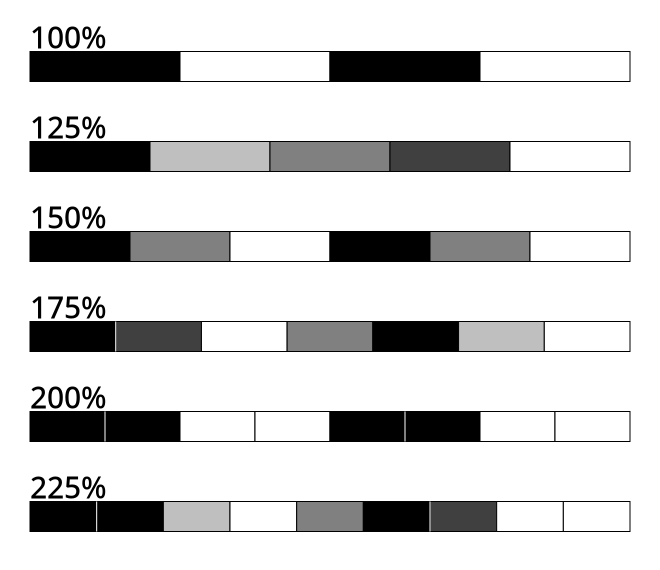
    Application vs. device pixels

    The common fractional scales are 125%, 150%, 175%, 200% and 225%. At these scales (with the exception of 200%), most application pixel boundaries do not align with device pixel boundaries.

    What now?

    The new renderers gave us an opportunity to revisit the topic of font rendering and do some research on the mechanics of hinting options, and how they get passed down the stack from GTK through Pango and cairo, and then end up in freetype as a combination of render target + load flags.
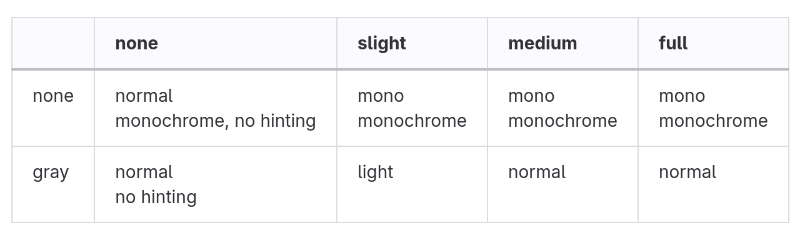
    Hint style and antialiasing options translate to render mode and load flags

    The new renders recognize that there’s two basic modes of operation when it comes to glyphs:

    • optimize for uniform spacing
    • optimize for crisp rendering

    The former leads to subpixel positioning and unhinted rendering, the latter to hinted rendering and glyphs that are placed at integral pixel positions (since that is what the autohinter expects).

    We determine which case we’re in by looking at the font options . If they tell us to do hinting, we round the glyph position to an integral device pixel in the y direction. Why only y? The autohinter only applies hinting in the vertical direction and the horizontal direction is where the increased resolution of subpixel positions helps most. If we are not hinting, then we use subpixel positions for both x and y, just like the old renderer.

    A comparison

    Text rendering differences are always subtle and, to some degree, a matter a taste and preference. So these screenshots should be taken with a grain of salt—it is much better to try the new renderers for yourself.
    Text rendered at 125%, old renderer Text rendered at 125%, new renderer
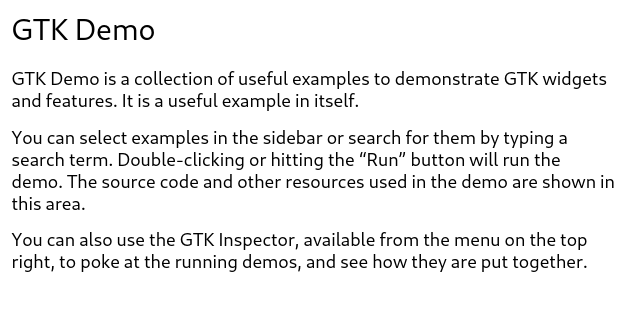
    Both of these renderings were done at a scale of 125%, with hinting enabled.

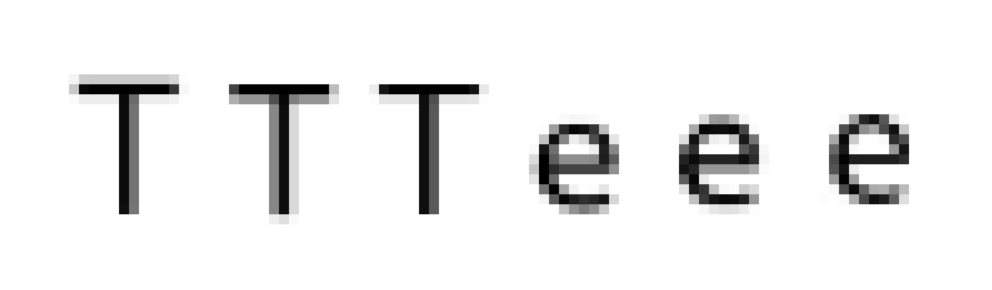
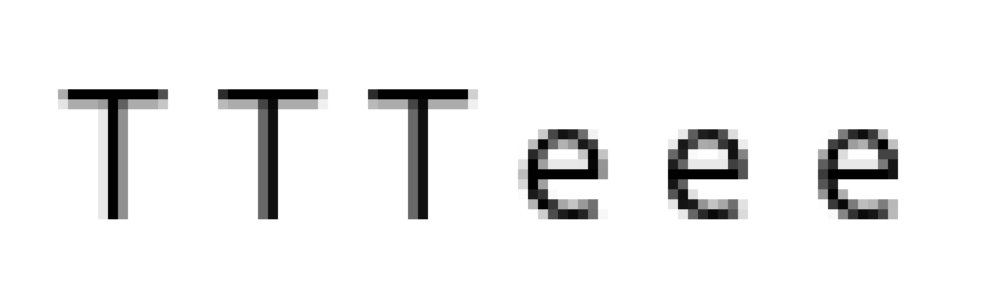
    Here is a look at some details: the horizontal bars of T and e are consistent across lines, even though we still allow the glyphs to shift by subpixel positions horizontally.
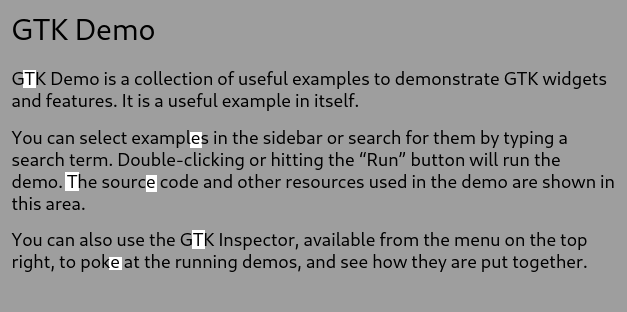
    Consistent vertical placement Instances of T and e, old renderer Instances of T and e, new renderer
    Summary

    The new renderers in GTK 4.14 should produce more crisp font rendering, in particular with fractional scaling.

    Please try it out and tell us what you think.

    • chevron_right

      Ismael Olea: Installing Linux with USB stick in a HP Z400

      news.movim.eu / PlanetGnome • 5 March, 2024 • 1 minute

    Just for the record:

    For our SMALL GLAM SLAM project we have received a donated HP Z400 Workstation . It’s has a Xeon CPU and can host 24Gb of ECC RAM, which seems appropiate for the project needs. But I found an annoying trouble installing Linux with a USB stick. It took me more than hour to search in the Internet for a solution. Now I just write here for the record and hoping the next one in this case could save precious time.

    The tip is pretty simple: the Z400 HP BIOS doesn’t like booting Linux in USB sticks and the solution is upgrade the machine firmware with a «Linux BIOS» from HP o_O

    The procedure:

    • go to the Z400 downloads page ;
    • choose «operating system» Linux and «version» Linux;
    • at the BIOS section you’ll find the file to download to disk;
    • now prepare a USB stick formated as VFAT and copy the firmware file inside;
    • plug the stick in the Z400 machine, boot and open BIOS (press F10 key);
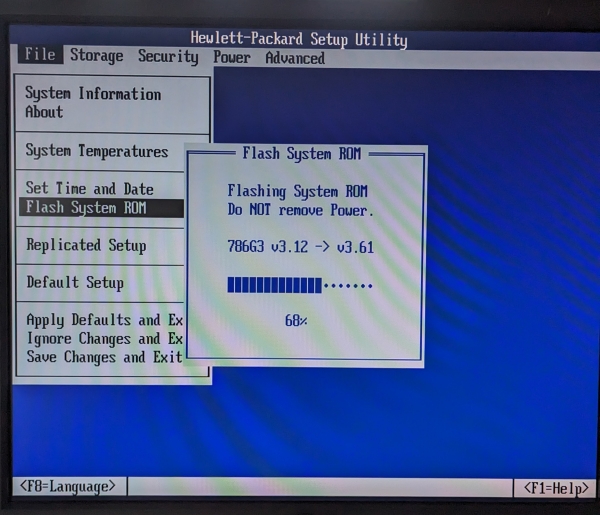
    • In the BIOS application choose [File]->[Flash System ROM]
    • then you’ll can select the firmware file from the USB memory and confirm the update process,
    • reboot and that’s all.

    HP_Z400_Workstation-BIOS_upgrade

    After that I could boot my Fedora USB stick and install without any other trouble.

    Hope you’ll find useful.

    • chevron_right

      Jussi Pakkanen: CapyPDF 0.9.0 released

      news.movim.eu / PlanetGnome • 4 March, 2024

    I have just released CapyPDF 0.9.0. It can be obtained either via Github or PyPI .

    There is no major big feature for this release. The most notable is probably the ability to create structured (or "tagged") PDF files. The code supports using both the builtin tags as well as defining your own. Feel free to try it, just know that the API is guaranteed to change.

    As a visual example, here is the full Python source code for one of the unit tests.

    When run it creates a tagged PDF file.  Adobe Acrobat reports that the document has the following logical structure.

    As you can (hopefully) tell, structure and content are the same in both of them.

    • chevron_right

      Christian Hergert: Improving poll() timeout precision

      news.movim.eu / PlanetGnome • 3 March, 2024 • 1 minute

    Recently I was looking at a VTE performance issue so I added a bunch of Sysprof timing marks to be picked up by the profiler. I combined that with GTK frame timing information and GNOME Shell timing information because Sysprof will just do that for you. I noticed a curious thing in that almost every ClutterFrameClock.dispatch() callback was rougly 1 millisecond late.

    A quick look at the source code shows that ClutterFrameClock uses g_source_set_ready_time() to specify it’s next deadline to awaken. That is in µsec using the synchronized monotonic clock ( CLOCK_MONOTONIC ).

    Except, for various reasons, GLib still uses poll() internally which only provides 1 millisecond timeout resolution. So whatever µsec deadline was requested by the ClutterFrameClock doesn’t really matter if nothing else wakes up around the same time. And since the GLib GSource code will always round up (to avoid spinning the CPU) that means a decent amount late.

    With the use of ppoll() out of question, the next thing to use on Linux would be a timerfd(2) .

    Here is a patch to make GLib do that. I don’t know if that is something we should have there as it will create an extra timerfd for every GMainContext you have, but it doesn’t seem insane to do it there either.

    If that isn’t to be, then here is a patch to ClutterFrameClock which does the same thing there.

    And finally, here is a graph of how the jitter looks when not using timerfd and when using timerfd .

    A graph comparing the use of timerfd in ClutterFrameClock. Before, there is an erratic line jumping many times between 100usec and 1000usec. After, the line is stable at around 10usec.