

-
 chevron_right
Ismael Olea: Installing Linux with USB stick in a HP Z400
news.movim.eu / PlanetGnome • 5 March, 2024 • 1 minute

Just for the record:
For our SMALL GLAM SLAM project we have received a donated HP Z400 Workstation . It’s has a Xeon CPU and can host 24Gb of ECC RAM, which seems appropiate for the project needs. But I found an annoying trouble installing Linux with a USB stick. It took me more than hour to search in the Internet for a solution. Now I just write here for the record and hoping the next one in this case could save precious time.
The tip is pretty simple: the Z400 HP BIOS doesn’t like booting Linux in USB sticks and the solution is upgrade the machine firmware with a «Linux BIOS» from HP o_O
The procedure:
- go to the Z400 downloads page ;
- choose «operating system» Linux and «version» Linux;
- at the BIOS section you’ll find the file to download to disk;
- now prepare a USB stick formated as VFAT and copy the firmware file inside;
- plug the stick in the Z400 machine, boot and open BIOS (press F10 key);
- In the BIOS application choose [File]->[Flash System ROM]
- then you’ll can select the firmware file from the USB memory and confirm the update process,
- reboot and that’s all.
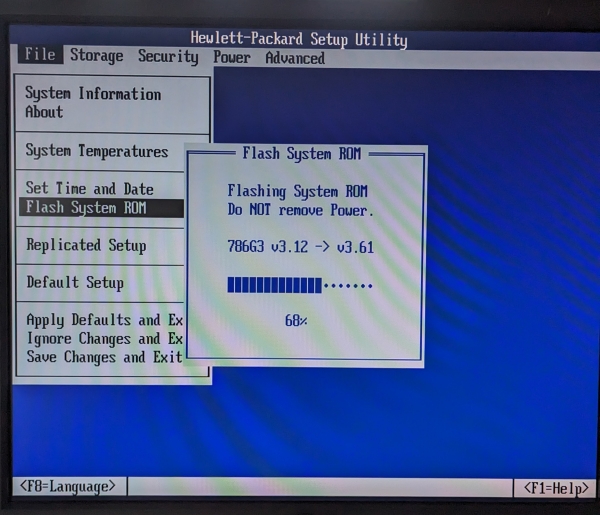
After that I could boot my Fedora USB stick and install without any other trouble.
Hope you’ll find useful.