
call_end

    • chevron_right

      Sebastian Wick: Flatpak Pre-Installation Approaches

      news.movim.eu / PlanetGnome • 18:17 • 3 minutes

    Together with my then-colleague Kalev Lember, I recently added support for pre-installing Flatpak applications. It sounds fancy, but it is conceptually very simple: Flatpak reads configuration files from several directories to determine which applications should be pre-installed. It then installs any missing applications and removes any that are no longer supposed to be pre-installed (with some small caveats).

    For example, the following configuration tells Flatpak that the devel branch of the app org.test.Foo from remotes which serve the collection org.test.Collection , and the app org.test.Bar from any remote should be installed:

    [Flatpak Preinstall org.test.Foo]
    CollectionID=org.test.Collection
    Branch=devel
    
    [Flatpak Preinstall org.test.Bar]
    

    By dropping in another confiuration file with a higher priority, pre-installation of the app org.test.Foo can be disabled:

    [Flatpak Preinstall org.test.Foo]
    Install=false
    

    The installation procedure is the same as it is for the flatpak-install command. It supports installing from remotes and from side-load repositories, which is to say from a repository on a filesystem.

    This simplicity also means that system integrators are responsible for assembling all the parts into a functioning system, and that there are a number of choices that need to be made for installation and upgrades.

    The simplest way to approach this is to just ship a bunch of config files in /usr/share/flatpak/preinstall.d and config files for the remotes from which the apps are available. In the installation procedure, flatpak-preinstall is called and it will download the Flatpaks from the remotes over the network into /var/lib/flatpak . This works just fine, until someone needs one of those apps but doesn’t have a suitable network connection.

    The next way one could approach this is exactly the same way, but with a sideload repository on the installation medium which contains the apps that will get pre-installed. The flatpak-preinstall command needs to be pointed at this repository at install time, and the process which creates the installation medium needs to be adjusted to create this repository. The installation process now works without a network connection. System updates are usually downloaded over the network, just as new pre-installed applications will be.

    It is also possible to simply skip flatpak-preinstall , and use flatpak-install to create a Flatpak installation containing the pre-installed apps which get shipped on the installation medium. This installation can then be copied over from the installation medium to /var/lib/flatpak in the installation process. It unfortunately also makes the installation process less flexible because it becomes impossible to dynamically build the configuration.

    On modern, image-based operating systems, it might be tempting to just ship this Flatpak installation on the image because the flexibility is usually neither required nor wanted. This currently does not work for the simple reason that the default system installation is in /var/lib/flatpak , which is not in /usr which is the mount point of the image. If the default system installation was in the image, then it would be read-only because the image is read-only. This means we could not update or install anything new to the system installation. If we make it possible to have two different system installations — one in the image, and one in /var — then we could update and install new things, but the installation on the image would become useless over time because all the runtimes and apps will be in /var anyway as they get updated.

    All of those issues mean that even for image-based operating systems, pre-installation via a sideload repository is not a bad idea for now. It is however also not perfect. The kind of “pure” installation medium which is simply an image now contains a sideload repository. It also means that a factory reset functionality is not possible because the image does not contain the pre-installed apps.

    In the future, we will need to revisit these approaches to find a solution that works seamlessly with image-based operating systems and supports factory reset functionality. Until then, we can use the systems mentioned above to start rolling out pre-installed Flatpaks.

    • chevron_right

      Asman Malika: My Outreachy Journey: From curiosity to contribution

      news.movim.eu / PlanetGnome • 4 days ago - 15:38 • 3 minutes

    Hello! I’m Asman Malika, and I still can’t quite believe I’m writing this as an Outreachy intern.

    I’m working on the GNOME project: Improving document signing in GNOME Document Viewer (Papers), focusing on adding both manual and digital signing features, and improving the user interface, through a smoother signing experience.

    Before I could even imagine working on a project like GNOME Papers, I was exploring a new side of software development. Just 19 months ago, I barely knew anything about coding. No degree, no bootcamp. Just curiosity, determination, and the urge to prove to myself that I belonged in tech.

    Today, I work with Rust, Go, JavaScript, C, React and I contribute to open-source projects. But the road to this point? Let’s just say it wasn’t straight.

    The struggles that led me here

    I’ve applied to opportunities before, and been rejected. Sometimes because of my identity. Sometimes because I didn’t have enough experience or a formal degree. Every rejection whispered the same doubt: maybe I wasn’t ready yet.

    But each rejection also pushed me to look for a space where effort, curiosity, and willingness to learn mattered more than credentials on paper. And then I found Outreachy. The moment I read about the program, it clicked: this was a place built for people like me.

    Why Outreachy felt different

    I didn’t just apply because I wanted an internship. I applied because I wanted to contribute meaningfully to real-world projects. After months of learning, experimenting, and self-teaching, I wanted to show that persistence counts,  that your journey doesn’t need to follow a traditional path to matter.

    The community aspect drew me in even more. Reading about past interns who started exactly where I was gave me hope. Every line of code I wrote during the application period felt like a building block towards improving myself. And the support from mentors and the wider community? I truly appreciate every bit of it.

    The contribution phase: chaos, learning, and late nights

    The contribution period tested my patience and resilience. Imagine this: working a full-time job (where I was still learning software development skills) during the day, then switching gears at night to contribute to Outreachy projects.

    Most of my real contribution time came late at night, fueled by curiosity, determination, and maybe a little too much coffee. I had to adapt and learn quickly from understanding unfamiliar project structures, to reading documentation, asking questions (which was terrifying at first), and sometimes struggling more than I expected.

    Some tasks took hours longer than anticipated. Some pull requests needed multiple revisions. Some nights, imposter syndrome kicked in.

    But every challenge taught me something meaningful. I learned how open-source communities operate: writing clean code, submitting patches, communicating clearly, and staying consistent. The biggest surprise? Collaborating in public. At first, it felt intimidating, every question, every mistake visible to everyone. But gradually, it became empowering. Asking for help isn’t weakness; it’s how real developers grow.

    Contributions I’m proud of

    I fixed bugs. Improved documentation. Implemented and tested features. Helped refine workflows.

    But here’s the truth: the real achievement wasn’t the list of tasks, it was consistency, I showed up when it was hard. I learned to work efficiently in a community, and contributed in ways that genuinely helped me grow as a developer.

    Even small contributions taught me big lessons. Each merged pull request felt like a win. Each piece of mentor feedback felt like progress. Every late night debugging was worth it because I was building something real.

    What I hope to gain

    I want to deepen my technical skills, learn best practices from my mentors, and make contributions that truly matter. I also hope to grow my confidence in open-source collaboration and continue growing a software developer.

    Throughout this journey, I want to document my progress and share my experiences with the community, reflecting on what I learn and hopefully inspire others along the way.
    • chevron_right

      Michael Catanzaro: Significant Drag and Drop Vulnerability in WebKitGTK

      news.movim.eu / PlanetGnome • 4 days ago - 15:29 • 1 minute

    WebKitGTK and WPE WebKit 2.50.3 contain a workaround for CVE-2025-13947 , an issue that allows websites to exfiltrate files from your filesystem. If you’re using Epiphany or any other web browser based on WebKitGTK or WPE WebKit, then you should immediately update to 2.50.3.

    Websites may attach file URLs to drag sources. When the drag source is dropped onto a drop target, the website can read the file data for its chosen files, without any restrictions. Oops. Suffice to say, this is not how drag and drop is supposed to work. Websites should not be able to choose for themselves which files to read from your filesystem; only the user is supposed to be able to make that choice, by dragging the file from an external application . That is, drag sources created by websites should not receive file access.

    I failed to find the correct way to fix this bug in the two afternoons I allowed myself to work on this issue, so instead my overly-broad solution was to disable file access for all drags . With this workaround, the website will only receive the list of file URLs rather than the file contents.

    Apple platforms are not affected by this issue.

    • chevron_right

      Jakub Steiner: Dithering

      news.movim.eu / PlanetGnome • 5 days ago - 14:35 • 1 minute

    One of the new additions to the GNOME 49 wallpaper set is Dithered Sun by Tobias . It uses dithering not as a technical workaround for color banding, but as an artistic device.

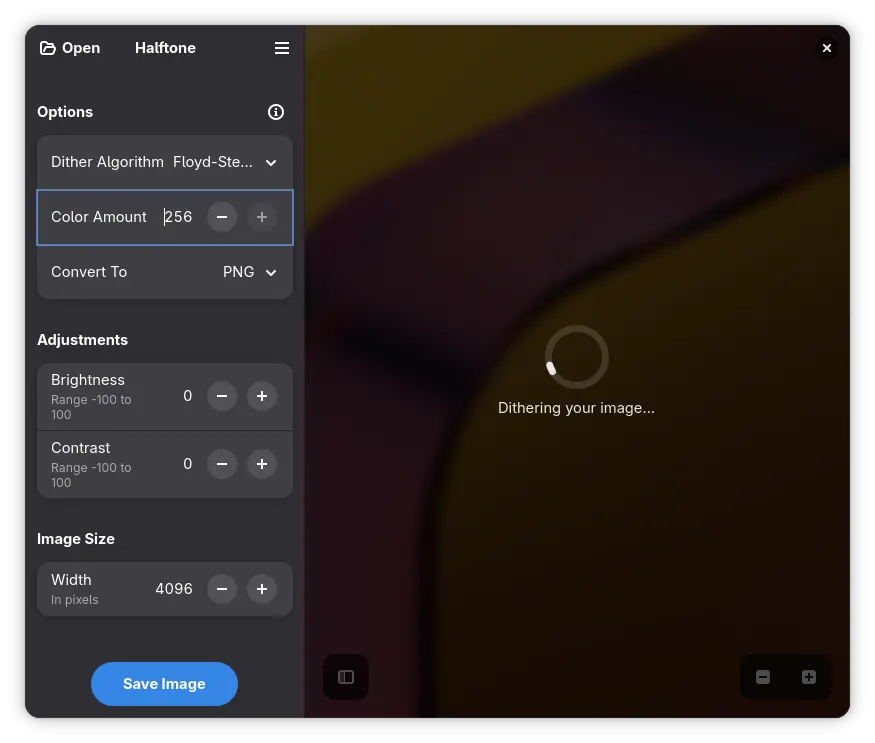
    Halftone app

    Tobias initially planned to use Halftone — a great example of a GNOME app with a focused scope and a pleasantly streamlined experience. However, I suggested that a custom dithering method and finer control over color depth would help execute the idea better. A long time ago, Hans Peter Jensen responded to my request for arbitrary color-depth dithering in GIMP by writing a custom GEGL op.

    Now, since the younger generation may be understandably intimidated by GIMP’s somewhat… vintage interface, I promised to write a short guide on how to process your images to get a nice ordered dither pattern without going overboard on reducing colors. And with only a bit of time passing since the amazing GUADEC in Brescia, I’m finally delivering on that promise. Better late than later.

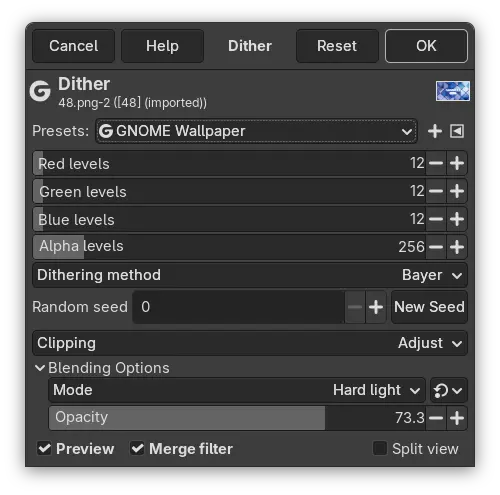
    GEGL dithering op

    I’ve historically used the GEGL dithering operation to work around potential color banding on lower-quality displays. In Tobias’ wallpaper, though, the dithering is a core element of the artwork itself. While it can cause issues when scaling (filtering can introduce moiré patterns), there’s a real beauty to the structured patterns of Bayer dithering.

    You will find the GEGL Op in Color > Dither menu. The filter/op parameters don’t allow you to set the number of colors directly—only the per-channel color depth (in bits). For full-color dithers I tend to use 12-bit . I personally like the Bayer ordered dither, though there are plenty of algorithms to choose from, and depending on your artwork, another might suit you better. I usually save my preferred settings as a preset for easier recall next time (find Presets at the top of the dialog).

    Happy dithering!

    • chevron_right

      Felipe Borges: One Project Selected for the December 2025 Outreachy Cohort with GNOME!

      news.movim.eu / PlanetGnome • 3 December

    We are happy to announce that the GNOME Foundation is sponsoring an Outreachy project for the December 2025 Outreachy cohort.

    Outreachy provides internships to people subject to systemic bias and impacted by underrepresentation in the tech industry where they are living.

    Let’s welcome Malika Asman! Malika will be working with Lucas Baudin on improving document signing in Papers , our document viewer.

    The new contributor will soon get their blogs added to Planet GNOME making it easy for the GNOME community to get to know them and the projects that they will be working on. We would like to also thank our mentor, Lucas  for supporting Outreachy and helping new contributors enter our project.

    If you have any questions, feel free to reply to this Discourse topic or message us privately at soc-admins@gnome.org.

    • chevron_right

      Cassidy James Blaede: Looking back on GNOME in 2025—and looking forward to 2026

      news.movim.eu / PlanetGnome • 2 December • 3 minutes

    foot-dark.png

    This past year has been an exceptional one for GNOME. The project released two excellent releases on schedule with GNOME 48 in March and GNOME 49 in September. Contributors have been relentless in delivering a set of new and improved default apps, constant performance improvements across the board benefitting everyone (but especially lower-specced hardware), a better experience on high end hardware like HiDPI and HDR displays, refined design and refreshed typography, all new digital wellbeing features and parental controls improvements, improved accessibility support across the entire platform, and much more.

    Just take a look back through This Week in GNOME where contributors provided updates on development every single week of 2025 so far. (And a huge thank you to Felix, who puts This Week in GNOME together !)

    All of these improvements were delivered for free to users of GNOME across distributions—and even beyond users of GNOME itself via GNOME apps running on any desktop thanks to Flatpak and distribution via Flathub.

    Earlier this year the GNOME Foundation also relaunched Friends of GNOME where you can set up a small recurring donation to help fund initiatives including:

    • infrastructure freely provided to Core, Circle, and World projects
    • services for GNOME Foundation members like blog hosting, chat, and video conferencing
    • development of Flathub
    • community travel sponsorship

    While I’m proud of what GNOME has accomplished in 2025 and that the GNOME Foundation is operating sustainably, I’m personally even more excited to look ahead to what I hope the Foundation will be able to achieve in the coming year.

    Let’s Reach 1,500 Friends of GNOME

    The newly-formed fundraising committee kicked off their efforts by announcing a simple goal to close out 2025: let’s reach 1,500 Friends of GNOME! If we can reach this goal by the end of this year, it will help GNOME deliver even more in 2026; for example, by enabling the Foundation to sponsor more community travel for hackfests and conferences, and potentially even sponsoring specific, targeted development work.

    But GNOME needs your help!

    How You Can Help

    First, if you’re not already a Friend of GNOME, please consider setting up a small recurring donation at donate.gnome.org . Every little bit helps, and donating less but consistently is super valuable to not only keep the lights on at the GNOME Foundation, but to enable explicit budgeting for and delivering on more interesting initiatives that directly support the community and the development of GNOME itself.

    Become a Friend of GNOME

    If you’re already a Friend of GNOME (or not able to commit to that at the moment—no hard feelings!), please considering sharing this message far and wide! I consistently hear that not only do so many users of GNOME not know that it’s a nonprofit, but they don’t know that the GNOME Foundation relies on individual donations—and that users can help out, too! Please share this post to your circles—especially outside of usual contributor spaces—to let them know the cool things GNOME does and that GNOME could use their help to be able to do even more in the coming year.

    Lastly, if you represent an organization that relies on GNOME or is invested in its continued success, please consider a corporate sponsorship . While this sponsorship comes with no strings attached, it’s a really powerful way to show that your organization supports Free and Open Source software—and puts their money where their mouth is.

    Sponsor GNOME

    Thank You!

    Thank you again to all of the dedicated contributors to GNOME making everyone’s computing experience that much better. As we close out 2025, I’m excited by the prospect of the GNOME Foundation being able to not just be sustainable, but—with your help—to take an even more active role in supporting our community and the development of GNOME.

    And of course, thank you to all 700+ current Friends of GNOME ; your gracious support has helped GNOME achieve everything in 2025 while ensuring the sustainability of the Foundation going forward. Let’s see if we can close out the year with 1,500 Friends helping GNOME do even more!

    • chevron_right

      Christian Hergert: Status Week 48

      news.movim.eu / PlanetGnome • 1 December • 2 minutes

    This week was Thanksgiving holiday in the US and I spent the entire week quite sick with something that was not Covid nor Flu according to rapid tests.

    Managed to get a few things done through sheer force of will. I don’t recommend it.

    Red Hat

    • A lot of misdirection related to our international move towards France where my wife has family. The policies at Red Hat may mean that we need to come up with a strategy to keep a million-plus lines of code maintained if my only option to protect my family is to go the route of long-stay-visa (e.g. work not permitted).

      Some very lovely people have reached out and thank you for that!

      Touch base if you have options that would allow me to work from France if you like my approach to engineering. While I’d love to continue working on GNOME/GTK and related technologies, some things are more important and so I’m flexible.

      Lets all hope that the Corporate Leadership Team at Red Hat determines that supporting multi-ethnic families get safely out of the United States near their support network is of value to our mutual success.

    Ptyxis

    • Triage a handful of issues. This project has a pretty high-velocity file-rate while having an pretty low “bug exists here” rate. This legitimately burns a lot of my time every week that could be spent creating things.

      So if you are going to file issues in projects like Ptyxis or Text Editor, please take the time to do basic binary-search on where the problem really exists. Points given just for trying.

      In fact, this is a rant about how you should do that in all aspects of your life. Cut the problems you have in half — and half again.

    Libdex

    • Fumbled my way through adding a gi override to integrate DexFuture with asyncio . This allows for await some_future() but you need to make sure you have a GLib main context running as well and integrated with asyncio .

      Hopefully this means that you will soon be able to easily use all the nice Foundry APIs from Python with relative ease.

    Foundry

    • Add support for communicating with SSH agent for simple signing requests. Was surprised to not find this in libssh2 but maybe I missed something. We already link against that for libgit2 support.

    • Add support for signing commits in the FoundryGitCommitBuilder commit helper. This supports GPG and SSH commit signing (no X509) because I have no need for it. Though the SSH form is tested best.

    • Iteration on tracking changes to untracked/unstaged/staged files while using the commit builder API.

    • Abstract commit signing into generic buffer signing so that it can be used for more things in the future (like signing tags).

    • Add support for staging/unstaging files, hunks, and lines.

    • New test-git-commit-builder-gtk to be able to test out the infrastructure for commit creation. It’s extremely scrappy but gets the job done enough to test the API out even if not very ergonomic.

    • New foundry_git_vcs_stash() helper to be like git stash .

    • Lots of new APIs around generating diffs, deltas, and patches.

    • Lots of refactoring of Git subsystem to make the combination of threading and convenient APIs easier to maintain.

    Builder

    • Some work on git change management panel, diff viewer, etc

    • VCS history panel which is useful as auxiliary for files as well as for viewing diffs.

    • Details auxiliary panel for forge issues/merge-requests

    • Experiment with using AdwPreferencesGroup and friends for creating AdwBottomSheet style menus in narrow mode (e.g. mobile).

    • chevron_right

      Sophie Herold: Weekly report #75

      news.movim.eu / PlanetGnome • 30 November • 3 minutes

    Hello world! Last week, I asked the people that financially support me, if I should post my updates publicly. A majority voted to release my future weekly reports to the public, some voted to make them public every other week. So I will try to post some of them publicly in the future.

    These updates are made possible by the amazing people that support me on Ko-fi , Patreon , Open Collective , and GitHub ! Thank you so much, folks!

    Since this is my first public weekly report, let’s maybe start with a short introduction: I started my GNOME related work in 2018 by working on Gajim and starting the Pika Backup project. Since March 2024 I have slowly started to ask for donations for my work on GNOME. I am disabled due to ME/CFS and being autistic. Working within the GNOME project allows me to earn a bit of extra money on top of my social assistance while also doing something that I love, and I can do at my own pace. I am working on too many things within GNOME: Pika Backup, Loupe, glycin, websites, Release Team, Circle Committee, and a bunch of other things, like trying to advocate for queer and disabled people within the GNOME community.

    You will notice that my weekly reports will usually not contain giant achievements or huge promises. Maintenance work can be tedious, and generally, fundraisers have developed a frustrating habit of frequently over-promising and under-delivering. I don’t want to be part of that.

    So, let’s finally get to the actual updates for last week. We landed the translation support within www.gnome.org. At the moment, this is still practically invisible. We are waiting for the Translation Team to enable translators to do the work. Once we got some translations, we will also enable the language selection dialog. I also asked if we want translations for donate.gnome.org , but got no feedback so far.

    A release for gst-thumbnailers is now out, such that distributions can package it. There is more about the thumbnailers in the Release Team issue .  I updated the Circle benefits list, and updated circle.gnome.org to the version that does not list apps and components on its own. That’s something design people wanted to see for a while. Since the old Circle page stopped building, that was a good moment to finally do it :)

    I spend some time on Pika Backup hoping that we are very close to a 0.8 beta release. However, I noticed that the current state of the setup dialog isn’t what we want. After discussing the options with Fina, we are now sure that we have to rework what we have in some way. Not shying away from throwing code away, and reworking something again, is often very important for approaching at a good result. Maybe I will summarize this example, once we have arrived at a solution.

    Some of the less tangible work this week: Shortly discussed Emmanuele’s GNOME Governance proposal in Matrix. Something that might look like making changes within GNOME more complicated from the outside. But the actual goal is the opposite: Currently, it can be very hard to make changes within GNOME since there is no clear way how to go about it. This not only slows people down but, at least for me, can also me quite emotionally draining. So, a very important proposal. Maybe we got a tiny step closer to making it reality. Also contributed to an internal Release Team discussion and contacted an involved party.

    That’s all for this week! If you want to support my work financially, you can check my GitLab profile .

    Hope you all have a great week!

    • chevron_right

      This Week in GNOME: #227 Circle Benefits

      news.movim.eu / PlanetGnome • 29 November • 3 minutes

    Update on what happened across the GNOME project in the week from November 22 to November 29.

    GNOME Circle Apps and Libraries

    Sophie (she/her) says

    The benefits for GNOME Circle projects now explicitly include the participation in internship programs as well as the inclusion on the help.gnome.org , welcome.gnome.org , apps.gnome.org or developer.gnome.org pages.

    The circle.gnome.org page as been redesigned to link to the respective pages instead of having its own app and component list.

    NewsFlash feed reader

    Follow your favorite blogs & news sites.

    Jan Lukas reports

    Last week Newsflash 4.2 was released with the usual amount of small improvements and fixes. What makes it worthy of the minor version bump in my opinion is the new popover right above the article containing all relevant font and spacing options for a more direct interaction, a new slightly different layout for tablets (specifically the PineNote) and combining multiple image enclosures into a carousel.

    newsflash-twig.png

    Third Party Projects

    Alain announces

    Planify 4.16.1 is now available!

    A small but polished update focused on improving the overall experience: • UX improvements and minor bug fixes • Shift+Enter is back for quick “keep adding” • Zoom links now supported in calendar events • Updated Donate page • The Planify website has been refreshed with a cleaner design and several improvements → https://www.useplanify.com

    Thanks for following the journey of Planify 💙

    Dzheremi announces

    Mass Lyrics Downloading with Chronograph 5.3

    Chronograph got an update with, as promised before, mass lyrics downloading support . Now users allowed to query LRClib to give them lyrics for all tracks in their current library. Chronograph will try to find the closest lyrics among results for your tracks. This feature expands coverage of the app usefulness for users, who doesn’t want to sync lyrics themselves, but want to just download them.

    Sync lyrics of your loved songs 🕒

    chronograph-mass-lyrics.png

    Parabolic

    Download web video and audio.

    Nick announces

    Parabolic V2025.11.1 is here! This release contains many bug fixes for issues users were experiencing.

    A larger new feature update is in the works to address many long standing feature requests.

    Here’s the full changelog:

    • Fixed the sleep interval for multiple subtitle downloads
    • Fixed an issue where low-resolution media was being downloaded on Windows
    • Fixed an issue where aria2c couldn’t download media from certain sites
    • Fixed an issue where Remove Source Data was not clearing all identifiable metadata fields

    parabolic.png

    Shell Extensions

    boerdereinar announces

    Hey everyone, this week I’ve released my clipboard manager extension Copyous with the following features:

    • Supports text, code, images, files, links, characters and colors.
    • Can be opened at mouse pointer or text cursor
    • Pin favorite items
    • Group items with 9 colored tags
    • Customizable clipboard actions
    • Highly customizable

    copyous-screenshot.png

    PakoVM announces

    This week I publish Tinted Shell, a extension that simply adds a spalsh of color to the Gnome Shell theme based on the user’s current accent color while respecting the original look.

    You can get it from Gnome Extensions and contribute to it on Github .

    tinted-shell-preview.png

    Miscellaneous

    Krafting - Vincent says

    Hey everyone, this week I pushed updates to use the GNOME 49 runtime, and revamping the keyboard shortcuts pages on all my apps available on Flathub :

    In addition, SemantiK got some versions bumps and PedantiK got a lot of bug fixes (including fixing the broken Wikipedia API)

    Also, work started on a PedantiK English pack, to allow languages other than french.

    GNOME Foundation

    Allan Day announces

    A new GNOME Foundation update is available , covering what has happened at the GNOME Foundation over the past two weeks. It covers a fairly long list of topics, including the recent budget report, funding for Outreachy, banking and finance changes, Flathub progress, and more.

    Digital Wellbeing Project

    Philip Withnall reports

    This week in parental controls, Ignacy is working on changing the Shell lock screen to show when a child’s screen time limit has been reached; and I’ve spent a bit of time writing up the technical details of how web filtering will work at https://tecnocode.co.uk/2025/11/27/parental-controls-web-filtering-backend/ (the backend is written, the UI integration is future work)

    That’s all for this week!

    See you next week, and be sure to stop by #thisweek:gnome.org with updates on your own projects!