
-
chevron_right
Ravgeet Dhillon: Building an AI-Powered Function Orchestrator: When AI Becomes Your Code Planner
news.movim.eu / PlanetGnome • 2 October • 5 minutes
-
chevron_right
Michael Meeks: 2025-10-01 Wednesday
news.movim.eu / PlanetGnome • 1 October
- Mail, admin, deeper copy-paste training & discussion with Miklos and the QA team for special focus - there is a thousands-wide potential test matrix there.
- Sync with Italo on marketing, lunch, catch up with Pedro.
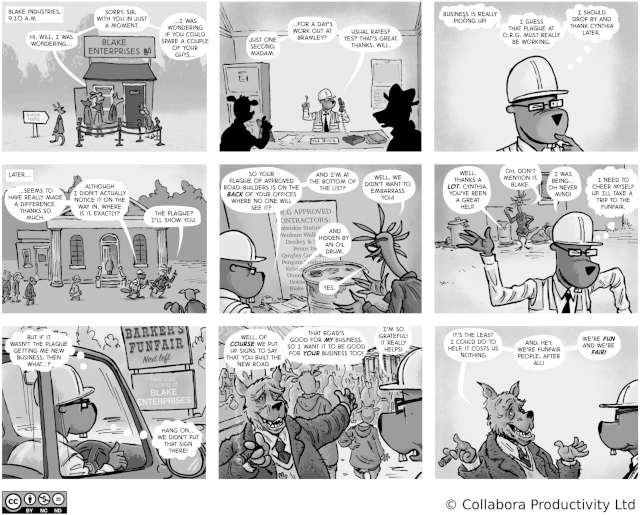
- Published the next strip on the joy of win-wins, and mutual benefits:
- Plugged away at the Product Management backlog.
-
chevron_right
Ignacio Casal Quinteiro: Servo GTK
news.movim.eu / PlanetGnome • 1 October • 1 minute
-
chevron_right
Debarshi Ray: Ollama on Fedora Silverblue
news.movim.eu / PlanetGnome • 1 October • 7 minutes
-
chevron_right
Hans de Goede: Fedora 43 will ship with FOSS Meteor, Lunar and Arrow Lake MIPI camera support
news.movim.eu / PlanetGnome • 30 September • 1 minute
-
chevron_right
Christian Hergert: Status Week 39
news.movim.eu / PlanetGnome • 30 September • 1 minute
-
Work on GtkAccessibleHypertext implementation. Somewhat complicated to track persistent accessible objects for the hyperlinks but it seems like I have a direction to move forward.
-
Fix CSS causing too much padding in header bar 49.0
-
Make
--working-directorywork properly with--new-windowwhen you want you also are restoring a session. -
Add support for
cell-widthcontrol in preferences -
Move an issue to mutter for more triage. Super+key doesn’t get delivered to the app until it’s pressed a second time. Not sure if this is by design or not.
-
Merge support for peel template in GTK/Adwaita
-
Lots of work on DAP support for FoundryDebugger
-
Some improvements to
FOUNDRY_JSON_OBJECT_PARSEand related helper macros. -
Handle failure to access session bus gracefully with flatpak build pipeline integration.
-
Helper to track changes to .git repository with file monitors.
-
Improve new SARIF support so we can get GCC diagnostics using their new GCC 16.0 feature set (still to land).
-
Lots of iteration on debugger API found by actually implementing the debugger support for GDB this time using DAP instead of MI2.
-
Blog post on how to write live-updating directory list models.
-
Merge FoundryAdw which will contain our IDE abstractions on top of libpanel to make it easy to create Builder like tooling.
-
Revive EggLine so I have a simple readline helper to implement a testing tool around the debugger API.
-
Rearrange some API on debuggers
-
Prototype a LLDB implementation to go along with GDB. Looks like it doesn’t implement thread events which is pretty annoying.
-
Fix issue with podman plugin over-zealously detecting it’s own work.
-
Make help show up in active workspace instead of custom window so that it can be moved around.
-
Write some blog posts
-
Add an async g_unlink() wrapper
-
Add
g_find_program_in_path()helper -
Fix app-id when using devel builds
-
Merge support for new-window GAction
-
Merge some improvements to the changes dialog
-
Numerous bugs which boil down to “ibus not installed”
-
Issue tracker chatter.
-
chevron_right
Jussi Pakkanen: In C++ modules globally unique module names seem to be unavoidable, so let's use that fact for good instead of complexshittification
news.movim.eu / PlanetGnome • 28 September • 4 minutes
- At the top of the build dir is a single directory for modules (GCC already does this, its directory is called gcm.cache )
- All generated module files are written in that directory, as they all have unique names they can not clash
- All module imports are done from that directory
- Module mappers and all related complexity can be dropped to the floor and ignored
- Accept reality and implement a system that is simple, reliable and working.
- Reject reality and implement a system that is complicated, unreliable and broken.
-
chevron_right
Allan Day: GNOME Foundation Update, 2025-09-26
news.movim.eu / PlanetGnome • 26 September • 1 minute
-
chevron_right
Michael Meeks: 2025-09-25 Thursday
news.movim.eu / PlanetGnome • 25 September
- Up early, mail, tech-planning call, tested latest CODE on share left & right. Lunch.
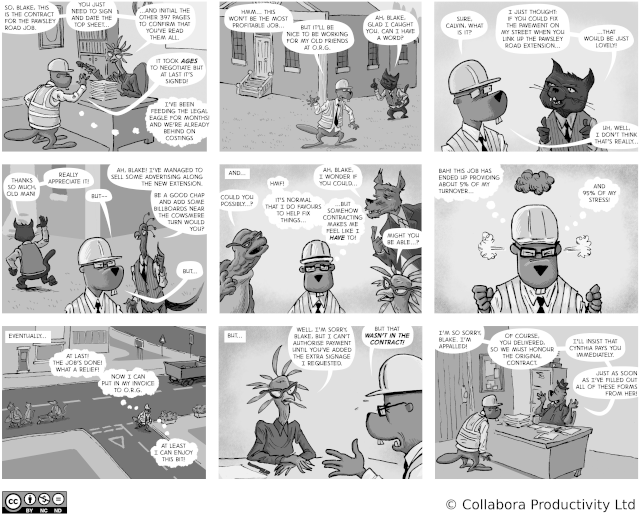
- Published the next strip: on the excitement of delivering against a tender:
- Sync with Lily.
- Collabora Productivity is looking to hire a(nother) Open Source clueful UX Designer to further accelerate our UX research and improvements. Some recent examples of the big wins there.
I just checked and it seems that it has been 9 years since my last post in this blog :O
As part of my job at Amazon I started working in a GTK widget which will allow embedding a Servo Webview inside a GTK application. This was mostly a research project just to understand the current state of Servo and whether it was at a good enough state to migrate from WebkitGTK to it. I have to admit that it is always a pleasure to work with Rust and the great gtk-rs bindings. Instead, Servo while it is not yet ready for production, or at least not for what we need in our product, it was simple to embed and to get something running in just a few days. The community is also amazing, I had some problems along the way and they were providing good suggestions to get me unblocked in no time.
This project can be found in the following git repo: https://github.com/nacho/servo-gtk
I also created some Issues with some tasks that can be done to improve the project in case that anyone is interested.
Finally I leave you here a the usual mandatory screenshot:
I found myself dealing with various rough edges and questions around running
Ollama
on
Fedora Silverblue
for the past few months. These arise from the fact that there are a few different ways of installing Ollama,
/usr
is a read-only mount point on Silverblue, people have different kinds of GPUs or none at all, the program that’s using Ollama might be a graphical application in a Flatpak or part of the operating system image, and so on. So, I thought I’ll document a few different use-cases in one place for future reference or maybe someone will find it useful.
Different ways of installing Ollama
There are at least three different ways of installing Ollama on Fedora Silverblue. Each of those have their own nuances and trade-offs that we will explore later.
First, there’s the popular single command POSIX shell script installer :
$ curl -fsSL https://ollama.com/install.sh | sh
There is a
manual step by step
variant for those who are uncomfortable with running a script straight off the Internet. They both install Ollama in the operating system’s
/usr/local
or
/usr
or
/
prefix, depending on which one comes first in the
PATH
environment variable, and attempts to enable and activate a systemd service unit that runs
ollama serve
.
Second, there’s a
docker.io/ollama/ollama
OCI
image
that can be used to put Ollama in a container. The container runs
ollama serve
by default.
Finally, there’s Fedora’s ollama RPM.
Surprise
Astute readers might be wondering why I mentioned the shell script installer in the context of Fedora Silverblue, because
/usr
is a read-only mount point. Won’t it break the script? Not really, or the script breaks but not in the way one might expect.
Even though,
/usr
is read-only on Silverblue,
/usr/local
is not, because it’s a symbolic link to /var/usrlocal, and Fedora defaults to putting /usr/local/bin earlier in the PATH environment variable than the other prefixes that the installer attempts to use, as long as
pkexec(1)
isn’t being used. This happy coincidence allows the installer to place the Ollama binaries in their right places.
The script
does fail
eventually when attempting to create the systemd service unit to run
ollama serve
, because it tries to create an ollama user with
/usr/share/ollama
as its home directory. However, this half-baked installation works surprisingly well as long as nobody is trying to use an AMD GPU.
NVIDIA GPUs work, if the proprietary driver and
nvidia-smi(1)
are present in the operating system, which are provided by the
kmod-nvidia
and
xorg-x11-drv-nvidia-cuda
packages from
RPM Fusion
; and so does CPU fallback.
Unfortunately, the results would be the same if the shell script installer is used inside a Toolbx container. It will fail to create the systemd service unit because it can’t connect to the system-wide instance of systemd.
Using AMD GPUs with Ollama is an important use-case. So, let’s see if we can do better than trying to manually work around the hurdles faced by the script.
OCI image
The
docker.io/ollama/ollama
OCI
image requires the user to know what processing hardware they have or want to use. To use it only with the CPU without any GPU acceleration:
$ podman run \
--name ollama \
--publish 11434:11434 \
--rm \
--security-opt label=disable \
--volume ~/.ollama:/root/.ollama \
docker.io/ollama/ollama:latest
This will be used as the baseline to enable different kinds of GPUs. Port 11434 is the default port on which the Ollama server listens, and
~/.ollama
is the default directory where it stores its SSH keys and artificial intelligence models.
To enable NVIDIA GPUs, the proprietary driver and
nvidia-smi(1)
must be present on the host operating system, as provided by the
kmod-nvidia
and
xorg-x11-drv-nvidia-cuda
packages from
RPM Fusion
. The user space driver has to be injected into the container from the host using
NVIDIA Container Toolkit
, provided by the
nvidia-container-toolkit
package from Fedora, for Ollama to be able to use the GPUs.
The first step is to generate a Container Device Interface (or CDI) specification for the user space driver:
$ sudo nvidia-ctk cdi generate --output /etc/cdi/nvidia.yaml
…
…
Then the container needs to be run with access to the GPUs, by adding the
--gpus
option to the baseline command above:
$ podman run \
--gpus all \
--name ollama \
--publish 11434:11434 \
--rm \
--security-opt label=disable \
--volume ~/.ollama:/root/.ollama \
docker.io/ollama/ollama:latest
AMD GPUs don’t need the driver to be injected into the container from the host, because it can be bundled with the OCI image. Therefore, instead of generating a CDI specification for them, an image that bundles the driver must be used. This is done by using the
rocm
tag for the
docker.io/ollama/ollama
image.
Then container needs to be run with access to the GPUs. However, the
--gpus
option only works for NVIDIA GPUs. So, the specific devices need to be spelled out by adding the
--devices
option to the baseline command above:
$ podman run \
--device /dev/dri \
--device /dev/kfd \
--name ollama \
--publish 11434:11434 \
--rm \
--security-opt label=disable \
--volume ~/.ollama:/root/.ollama \
docker.io/ollama/ollama:rocm
However, because of how AMD GPUs are programmed with
ROCm
, it’s possible that some decent GPUs might not be supported by the
docker.io/ollama/ollama:rocm
image. The ROCm compiler needs to explicitly support the GPU in question, and Ollama needs to be built with such a compiler. Unfortunately, the binaries in the image leave out support for some GPUs that would otherwise work. For example, my AMD Radeon RX 6700 XT isn’t supported.
This can be verified with nvtop(1) in a Toolbx container. If there’s no spike in the GPU and its memory then its not being used.
It will be good to support as many AMD GPUs as possible with Ollama. So, let’s see if we can do better.
Fedora’s ollama RPM
Fedora offers a very capable
ollama
RPM, as far as AMD GPUs are concerned, because Fedora’s ROCm stack supports a lot more GPUs than other builds out there. It’s possible to check if a GPU is supported either by using the RPM and keeping an eye on
nvtop(1)
, or by comparing the name of the GPU shown by rocminfo with those listed in the
rocm-rpm-macros
RPM.
For example, according to
rocminfo
, the name for my AMD Radeon RX 6700 XT is
gfx1031
, which is listed in
rocm-rpm-macros
:
$ rocminfo
ROCk module is loaded
=====================
HSA System Attributes
=====================
Runtime Version: 1.1
Runtime Ext Version: 1.6
System Timestamp Freq.: 1000.000000MHz
Sig. Max Wait Duration: 18446744073709551615 (0xFFFFFFFFFFFFFFFF) (timestamp count)
Machine Model: LARGE
System Endianness: LITTLE
Mwaitx: DISABLED
DMAbuf Support: YES
==========
HSA Agents
==========
*******
Agent 1
*******
Name: AMD Ryzen 7 5800X 8-Core Processor
Uuid: CPU-XX
Marketing Name: AMD Ryzen 7 5800X 8-Core Processor
Vendor Name: CPU
Feature: None specified
Profile: FULL_PROFILE
Float Round Mode: NEAR
Max Queue Number: 0(0x0)
Queue Min Size: 0(0x0)
Queue Max Size: 0(0x0)
Queue Type: MULTI
Node: 0
Device Type: CPU
…
…
*******
Agent 2
*******
Name: gfx1031
Uuid: GPU-XX
Marketing Name: AMD Radeon RX 6700 XT
Vendor Name: AMD
Feature: KERNEL_DISPATCH
Profile: BASE_PROFILE
Float Round Mode: NEAR
Max Queue Number: 128(0x80)
Queue Min Size: 64(0x40)
Queue Max Size: 131072(0x20000)
Queue Type: MULTI
Node: 1
Device Type: GPU
…
…
The
ollama
RPM can be installed inside a Toolbx container, or it can be layered on top of the base
registry.fedoraproject.org/fedora
image to replace the
docker.io/ollama/ollama:rocm
image:
FROM registry.fedoraproject.org/fedora:42
RUN dnf --assumeyes upgrade
RUN dnf --assumeyes install ollama
RUN dnf clean all
ENV OLLAMA_HOST=0.0.0.0:11434
EXPOSE 11434
ENTRYPOINT ["/usr/bin/ollama"]
CMD ["serve"]
Unfortunately, for obvious reasons, Fedora’s
ollama
RPM doesn’t support NVIDIA GPUs.
Conclusion
From the puristic perspective of not touching the operating system’s OSTree image, and being able to easily remove or upgrade Ollama, using an OCI container is the best option for using Ollama on Fedora Silverblue. Tools like Podman offer a suite of features to manage OCI containers and images that are far beyond what the POSIX shell script installer can hope to offer.
It seems that the realities of GPUs from AMD and NVIDIA prevent the use of the same OCI image, if we want to maximize our hardware support, and force the use of slightly different Podman commands and associated set-up. We have to create our own image using Fedora’s
ollama
RPM for AMD, and the
docker.io/ollama/ollama:latest
image with NVIDIA Container Toolkit for NVIDIA.
I've also prepared an updated libcamera-0.5.2 Fedora package with support for IPU7 (Lunar Lake) CSI2 receivers as well as backporting a set of upstream SwStats and AGC fixes, fixing various crashes as well as the bad flicker MIPI camera users have been hitting with libcamera 0.5.2.
Together these 2 updates should make Fedora 43's FOSS MIPI camera support work on most Meteor Lake, Lunar Lake and Arrow Lake laptops!
If you want to give this a try, install / upgrade to Fedora 43 beta and install all updates. If you've installed rpmfusion's binary IPU6 stack please run:
sudo dnf remove akmod-intel-ipu6 'kmod-intel-ipu6*'
to remove it as it may interfere with the FOSS stack and finally reboot. Please first try with qcam:
sudo dnf install libcamera-qcam
qcam
which only tests libcamera and after that give apps which use the camera through pipewire a try like gnome's "Camera" app (snapshot) or video-conferencing in Firefox.
Note snapshot on Lunar Lake triggers a bug in the LNL Vulkan code, to avoid this start snapshot from a terminal with:
GSK_RENDERER=gl snapshot
If you have a MIPI camera which still does not work please file a bug following these instructions and drop me an email with the bugzilla link at hansg@kernel.org.
It’s the time of year where the Oregon allergens has me laid out. Managed to get some stuff done while cranking up the air purifier.
VTE
Ptyxis
Foundry
Builder
Libdex
Manuals
Libpanel
Text Editor
D-Spy
Writing out C++ module files and importing them is awfully complicated. The main cause for this complexity is that the C++ standard can not give requirements like "do not engage in Vogon-level stupidity, as that is not supported". As a result implementations have to support anything and everything under the sun. For module integration there are multiple different approaches ranging from custom on-the-fly generated JSON files (which neither Ninja nor Make can read so you need to spawn an extra process per file just to do the data conversion, but I digress) to custom on-the-fly spawned socket server daemons that do something. It's not really clear to me what.
Instead of diving to that hole, let's instead approach the problem from first principles from the opposite side.
The common setup
A single project consists of a single source tree. It consists of a single executable E and a bunch of libraries L1 to L99, say. Some of those are internal to the project and some are external dependencies. For simplicity we assume that they are embedded as source within the parent project. All libraries are static and are all linked to the executable E.
With a non-module setup each library can have its own header/source pair with file names like utils.hpp and utils.cpp . All of those can be built and linked in the same executable and, assuming their symbol names won't clash, work just fine. This is not only supported, but in fact quite common.
What people actually want going forward
The dream, then, is to convert everything to modules and have things work just as they used to.
If all libraries were internal, it could be possible to enforce that the different util libraries get different module names. If they are external, you clearly can't. The name is whatever upstream chooses it to be. There are now two modules called utils in the build and it is the responsibility of someone (typically the build system, because no-one else seems to want to touch this) to ensure that the two module files are exposed to the correct compilation commands in the correct order.
This is complex and difficult, but once you get it done, things should just work again. Right?
That is what I thought too, but that is actually not the case. This very common setup does not work, and can not be made to work. You don't have to take my word for it, here is a quote from Jonathan Wakely :
This is already IFNDR , and can cause standard ODR-like issues as the name of the module is used as the discriminator for module-linkage entities and the module initialiser function. Of course that only applies if both these modules get linked into the same executable;
IFNDR (ill-formed, no diagnostic required) is a technical term for "if this happens to you, sucks to be you". The code is broken and the compiler is allowed to whatever it wants with it (including s.
What does it mean in practice?
According to my interpretation of Jonathan's comment (which, granted, might be incorrect as I am not a compiler implementer) if you have an executable and you link into it any code that has multiple modules with the same name, the end result is broken. It does not matter how the same module names get in, the end result is broken. No matter how much you personally do not like this and think that it should not happen, it will happen and the end result is broken.
At a higher level this means that this property forms a namespace. Not a C++ namespace, but a sort of a virtual name space. This contains all "generally available" code, which in practice means all open source library code. As that public code can be combined in arbitrary ways it means that if you want things to work, module names must be globally unique in that set of code (and also in every final executable). Any duplicates will break things in ways that can only be fixed by renaming all but one of the clashing modules.
Globally unique modules names is thus not a "recommendation", "nice to have" or "best practice". It is a technical requirement that comes directly from the compiler and standard definition.
The silver lining
If we accept this requirement and build things on top of it, things suddenly get a lot simpler. The build setup for modules reduces to the following for projects that build all of their own modules:
So now you have two choices:
It’s Friday, which means that it’s time for another GNOME Foundation update. Here’s what’s been happening over the past week.
Work in progress
We currently have a number of work items that are in progress, but which we aren’t quite ready to talk about in detail yet. This includes progress on GIMP’s development grants, as well as updates to our policies, conversations with lawyers, and ongoing work on the budget for the next financial year. We’ll be providing updates about these items in the coming weeks once they’re closer to completion. I just wanted to mention them here to emphasise that these things are ongoing.
Banking
Some of our directors have been looking at our bank accounts this week, to see if we can improve how we manage our savings. We have a call set up with one of our banks for later today, and will likely be making some changes in the coming weeks.
Digital wellbeing
As mentioned previously, our digital wellbeing program, which is being funded by a grant from Endless, is in its final stages. Philip and Ignacy who are working on the project are making good progress, and we had a call this week to review progress and plan next steps. Many thanks to the maintainers who have been helping to review this work so we can get it merged before the end of the project.
Regular board meeting
Board meetings happen on the 2nd and 4th Tuesday of the month, so we had another regular board meeting this week. The Board reviewed and discussed the budget again, and signed off on a funding decision that required its approval.
Message ends
That’s it! See you in a week.
- cloud_queue