
call_end

    • chevron_right

      Sam Thursfield: Status update, 15/06/2025

      news.movim.eu / PlanetGnome • 15 June, 2025 • 7 minutes
    This month I created a personal data map where I tried to list all my important digital identities.

    (It’s actually now a spreadsheet, which I’ll show you later. I didn’t want to start the blog post with something as dry as a screenshot of a spreadsheet.)

    Anyway, I made my personal data map for several reasons.

    The first reason was to stay safe from cybercrime . In a world of increasing global unfairness and inequality, of course crime and scams are increasing too. Schools don’t teach how digital tech actually works, so it’s a great time to be a cyber criminal. Imagine being a house burglar in a town where nobody knows how doors work.

    Lucky for me, I’m a professional door guy. So I don’t worry too much beyond having a really really good email password (it has numbers and letters). But its useful to double check if I have my credit card details on a site where the password is still “sam2003”.

    The second reason is to help me migrate to services based in Europe . Democracy over here is what it is, there are good days and bad days, but unlike the USA we have at least more options than a repressive death cult and a fundraising business. (Shout to @angusm@mastodon.social for that one). You can’t completely own your digital identity and your data, but you can at least try to keep it close to home.

    The third reason was to see who has the power to influence my online behaviour .

    This was an insight from reading the book Technofuedalism . I’ve always been uneasy about websites tracking everything I do. Most of us are, to the point that we have made myths like “your phone microphone is always listening so Instagram can target adverts”. (As McSweeney’s Internet Tendency confirms, it’s not! It’s just tracking everything you type, every app you use, every website you visit, and everywhere you go in the physical world ).

    I used to struggle to explain why all that tracking feels bad bad. Technofuedalism frames a concept of cloud capital , saying this is now more powerful than other kinds of capital because cloud capitalists can do something Henry Ford, Walt Disney and The Monopoly Guy can only dream of: mine their data stockpile to produce precisely targeted recommendations, search bubbles and adverts which can influence your behaviour before you’ve even noticed .

    This might sound paranoid when you first hear it, but consider how social media platforms reward you for expressing anger and outrage. Remember the first time you saw a post on Twitter from a stranger that you disagreed with? And your witty takedown attracted likes and praise? This stuff can be habit-forming.

    In the 20th century, ad agencies changed people’s buying patterns and political views using billboards, TV channel and newspapers. But all that is like a primitive blunderbuss compared to recommendation algorithms, feedback loops and targeted ads on social media and video apps.

    I lived through the days when web search for “Who won the last election” would just return you 10 pages that included the word “election”. (If you’re nostalgic for those days… you’ll be happy to know that GNOME’s desktop search engine still works like that today! 🙂 I can spot when apps trying to ‘nudge’ me with dark patterns. But kids aren’t born with that skill, and they aren’t necessarily going to understand the nature of Tech Billionaire power unless we help them to see it. We need a framework to think critically and discuss the power that Meta, Amazon and Microsoft have over everyone’s lives. Schools don’t teach how digital tech actually works, but maybe a “personal data map” can be a useful teaching tool?

    By the way, here’s what my cobbled-together “Personal data map” looks like, taking into account security, what data is stored and who controls it. ( With some fake data… I don’t want this blog post to be a “How to steal my identity” guide. )

    Name Risks Sensitivity rating Ethical rating Location Controlle r First factor Second factor Credentials cached? Data stored
    Bank account Financial loss 10 2 Europe Bank Fingerprint None On phone Money, transactions
    Instagram Identity theft 5 -10 USA Meta Password Email On phone Posts, likes, replies, friends, views, time spent, locations, searches.
    Google Mail ( sam@gmail.com ) Reset passwords 9 -5 USA Google Password None Yes – cookies Conversations, secrets
    Github Impersonation 3 3 USA Microsoft Password OTP Yes – cookies Credit card, projects, searches.

    How is it going migrating off USA based cloud services?

    “The internet was always a project of US power”, says Paris Marx , a keynote at PublicSpaces conference , which I never heard of before.

    Closing my Amazon account took an unnecessary amount of steps, and it was sad to say goodbye to the list of 12 different address I called home at various times since 2006, but I don’t miss it; I’ve been avoiding Amazon for years anyway. When I need English-language books, I get them from an Irish online bookstore named Kenny’s. (Ireland, cleverly, did not leave the EU so they can still ship books to Spain without incurring import taxes).

    Dropbox took a while because I had years of important stuff in there. I actually don’t think they’re too bad of a company, and it was certainly quick to delete my account. (And my data… right? You guys did delete all my data?).

    I was using Dropbox to sync notes with the Joplin notes app, and switched to the paid Joplin Cloud option , which seems a nice way to support a useful open source project.

    I still needed a way to store sensitive data, and realized I have access to Protondrive. I can’t recommend that as a service because the parent company Proton AG don’t seem so serious about Linux support, but I got it to work thanks to some heroes who added a protondrive backend to rclone .

    Instead of using Google cloud services to share photos, and to avoid anything so primitive as an actual cable, I learned that KDE Connect can transfer files from my Android phone over my laptop really neatly. KDE Connect is really good . On the desktop I use GSConnect which integrates with GNOME Shell really well. I think I’ve not been so impressed by a volunteer-driven open source project in years. Thanks to everyone who worked on these great apps!

    I also migrated my VPS from a US-based host Tornado VPS to one in Europe. Tornado VPS (formally prgmr.com) are a great company, but storing data in the USA doesn’t seem like the way forwards.

    That’s about it so far. Feels a bit better.

    What’s next?

    I’m not sure whats next!

    I can’t leave Github and Gitlab.com, but my days of “Write some interesting new code and push it straight to Github” are long gone. I didn’t sign up to train somebody else’s LLM for free, and neither should you. (I’m still interested in sharing interesting code with nice people, of course, but let’s not make it so easy for Corporate America to take our stuff without credit or compensation. Bring back the “ sneakernet “!)

    Leaving Meta platforms and dropping YouTube doesn’t feel directly useful. It’s like individually renouncing debit cards, or air travel: a lot of inconvenience for you, but the business owners don’t even notice. The important thing is to use the alternatives more . Hence why I still write a blog in 2025 and mostly read RSS feeds and the Fediverse. Gigs where I live are mostly only promoted on Instagram, but I’m sure that’s temporary.

    In the first quarter of 2025, rich people put more money into AI startups than everything else put together (see: Pivot to AI ). Investors love a good bubble, but there’s also an element of power here.

    If programmers only know how to write code using Copilot, then Microsoft have the power to decide what code we can and can’t write. (This currently this seems limited to not using the word ‘gender’ . But I can imagine a future where it catches you reverse-engineering proprietary software, or jailbreaking locked-down devices, or trying write a new Bittorrent client).

    If everyone gets their facts from ChatGPT, then OpenAI have the power to tweak everyone’s facts, an ability that is currently limited only to presidents of major world superpowers. If we let ourselves avoid critical thinking and rely on ChatGPT to generate answers to hard questions instead, which teachers say is very much exactly what’s happening in schools now … then what?

    • chevron_right

      Adetoye Anointing: More Than Code: Outreachy Gnome Experience

      news.movim.eu / PlanetGnome • 8 March, 2025 • 3 minutes

    It has been a productive, prosperous, and career-building few months—from contemplating whether to apply for the contribution stage, to submitting my application at the last minute, to not finding a Go project, then sprinting through a Rust course after five days of deliberation. Eventually, I began actively contributing to librsvg in Rust, updated a documentation section, closed a couple of issues, and was ultimately selected for the Outreachy December 2024 – March 2025 cohort as an intern for the GNOME Foundation.

    It has been a glorious journey, and I thank God for His love and grace throughout the application process up to this moment as I write this blog. I would love to delve into my journey to getting accepted into Outreachy, but since this blog is about reflecting on the experience as it wraps up, let’s get to it.

    Overcoming Fear and Doubt

    You might think my fears began when I got accepted into the internship, but they actually started much earlier. Before even applying, I was hesitant. Then, when I got in for the contribution phase, I realized that the language I was most familiar with, Go, was not listed.I felt like I was stepping into a battlefield with thousands of applicants, and my current arsenal was irrelevant. I believed I would absolutely dominate with Go, but now I couldn’t even find a project using it!

    This fear lingered even after I got accepted. I kept wondering if I was going to mess things up terribly.
    It takes time to master a programming language, and even more time to contribute to a large project. I worried about whether I could make meaningful contributions and whether I would ultimately fail.

    And guess what? I did not fail. I’m still here, actively contributing to librsvg, and I plan to continue working on other GNOME projects. I’m now comfortable writing Rust, and most importantly, I’ve made huge progress on my project tasks. So how did I push past my fear? I initially didn’t want to apply at all, but a lyric from Dave’s song Survivor’s Guilt stuck with me: “When you feel like givin’ up, know you’re close.” Another saying that resonated with me was, “You never know if you’ll fail or win if you don’t try.” I stopped seeing the application as a competition with others and instead embraced an open mindset: “I’ve always wanted to learn Rust, and this is a great opportunity.” “I’m not the best at communication, but maybe I can grow in that area.” Shifting my mindset from fear to opportunity helped me stay the course, and my fear of failing never materialized.

    My Growth and Learning Process

    For quite some time, I had been working exclusively with a single programming language, primarily building backend applications. However, my Outreachy internship experience opened me up to a whole new world of possibilities. Now, I program in Rust, and I have learned a lot about SVGs, the XML tree, text rendering, and much more.

    My mentor has been incredibly supportive, and thanks to him, I believe I will be an excellent mentor when I find myself in a position to guide others. His approach to communication, active listening, and problem-solving has left a strong impression on me, and I’ve found myself subconsciously adopting his methods. I also picked up some useful Git tricks from him and improved my ability to visualize and break down complex problems.

    I have grown in technical knowledge, soft skills, and networking—my connections within the open-source community have expanded significantly!

    Project Progress and Next Steps

    The project’s core algorithms are now in place, including text-gathering, whitespace handling, text formatting, attribute collection, shaping, and more. The next step is to integrate these components to implement the full SVG2 text layout algorithm.

    As my Outreachy internship with GNOME comes to an end today, I want to reflect on this incredible journey and express my gratitude to everyone who made it such a rewarding experience.

    I am deeply grateful to God, the Outreachy organizers, my family, my mentor Federico (GNOME co-founder), Felipe Borges, and everyone who contributed to making this journey truly special. Thank you all for an unforgettable experience.

    • chevron_right

      Carlos Garnacho: Embracing sysexts for system development under Silverblue

      news.movim.eu / PlanetGnome • 8 March, 2025 • 3 minutes

    Due to my circumstances, I might be perhaps interested in dogfooding a larger number of GNOME system/session components on a daily basis than the average.

    So far, I have been using jhbuild to help me with this deed, mostly in the form of jhbuild make to selectively build projects out of their git tree. See, there’s a point in life where writing long-winded CLI commands stop making you feel smart and work the opposite way, jhbuild had a few advantages I liked:

    • I could reset and rebuild build trees without having to remember project-specific meson args.
    • The build dir did not pollute the source dir, and would be wiped out without any loss.
    • The main command is pretty fast to type with minimal finger motion for something done so frequently, jh<tab>.

    This, combined with my habit to use Fedora Rawhide also meant I did not require to rebuild the world to get up-to-date dependencies, keeping the number of miscellaneous modules built to a minimum.

    This was all true even after Silverblue came around, and Florian unlocked the “run GNOME as built from toolbox” achievement . I adopted this methodology, but still using jhbuild to build things inside that toolbox, for the sake of convenience.

    Enter sysext-utils

    Meanwhile, systemd sysexts came around as a way to install “extensions” to the base install, even over atomic distributions, paving a way for development of system components to happen in these distributions. More recently Martín Abente brought an excellent set of utilities to ease building such sysexts.

    This is a great step in the direction towards sysexts as a developer testing method. However, there is a big drawback for users of atomic distributions: to build these sysexts you must have all necessary build dependencies in your host system. Basically, desecrating your small and lean atomic install with tens to hundreds of packages. While for GNOME OS it may be true that it comes “with batteries included”, feels like a very big margin to miss the point with Silverblue, where the base install is minimal and you are supposed to carry development with toolbox, install apps with flatpak, etc etc.

    What is necessary

    Ideally, in these systems, we’d want:

    1. A toolbox matching the version of the host system.
    2. With all development tools and dependencies installed
    3. The sysexts to be created from inside the toolbox
    4. The sysexts to be installed in the host system
    5. But also, the installed sysexts need to be visible from inside the toolbox, so that we can build things depending on them

    The most natural way to achieve both last points is building things so they install in /usr/local, as this will allow us to also mount this location from the host inside the toolbox, in order to build things that depend on our own sysexts.

    And last, I want an easy way to manage these projects that does not get in the middle of things, is fast to type, etc.

    Introducing gg

    So I’ve made a small script to help myself on these tasks. It can be installed at ~/.local/bin along with sysext-utils, and be used in a host shell to generate, install and generally manage a number of sysexts.

    Sysexts-utils is almost there for this, I however needed some local hacks to help me get by:

    – Since I have these are installed at ~/.local , but they will be run with pkexec to do things as root, the python library lookup paths had to be altered in the executable scripts ( sysext-utils#10 ).
    – They are ATM somewhat implicitly prepared to always install things at /usr, I had to alter paths in code to e.g. generate GSettings schemas at the right location ( sysext-utils#11 ).

    Hopefully these will be eventually sorted out. But with this I got 1) a pristine atomic setup and 2) My tooling in ~/.local 3) all the development environment in my home dir, 4) a simple and fast way to manage a number of projects. Just most I ever wanted from jhbuild.

    This tool is a hack to put things together, done mainly so it’s intuitive and easy to myself. So far been using it for a week with few regrets except the frequent password prompts. If you think it’s useful for you too, you’re welcome.

    • chevron_right

      Andy Wingo: whippet lab notebook: untagged mallocs, bis

      news.movim.eu / PlanetGnome • 7 March, 2025 • 5 minutes

    Earlier this week I took an inventory of how Guile uses the Boehm-Demers-Weiser (BDW) garbage collector, with the goal of making sure that I had replacements for all uses lined up in Whippet . I categorized the uses into seven broad categories, and I was mostly satisfied that I have replacements for all except the last: I didn’t know what to do with untagged allocations: those that contain arbitrary data, possibly full of pointers to other objects, and which don’t have a header that we can use to inspect on their type.

    But now I do! Today’s note is about how we can support untagged allocations of a few different kinds in Whippet’s mostly-marking collector .

    inside and outside

    Why bother supporting untagged allocations at all? Well, if I had my way, I wouldn’t; I would just slog through Guile and fix all uses to be tagged. There are only a finite number of use sites and I could get to them all in a month or so.

    The problem comes for uses of scm_gc_malloc from outside libguile itself, in C extensions and embedding programs. These users are loathe to adapt to any kind of change, and garbage-collection-related changes are the worst. So, somehow, we need to support these users if we are not to break the Guile community.

    on intent

    The problem with scm_gc_malloc , though, is that it is missing an expression of intent, notably as regards tagging. You can use it to allocate an object that has a tag and thus can be traced precisely, or you can use it to allocate, well, anything else. I think we will have to add an API for the tagged case and assume that anything that goes through scm_gc_malloc is requesting an untagged, conservatively-scanned block of memory. Similarly for scm_gc_malloc_pointerless : you could be allocating a tagged object that happens to not contain pointers, or you could be allocating an untagged array of whatever. A new API is needed there too for pointerless untagged allocations.

    on data

    Recall that the mostly-marking collector can be built in a number of different ways: it can support conservative and/or precise roots, it can trace the heap precisely or conservatively, it can be generational or not, and the collector can use multiple threads during pauses or not. Consider a basic configuration with precise roots. You can make tagged pointerless allocations just fine: the trace function for that tag is just trivial. You would like to extend the collector with the ability to make untagged pointerless allocations, for raw data. How to do this?

    Consider first that when the collector goes to trace an object, it can’t use bits inside the object to discriminate between the tagged and untagged cases. Fortunately though the main space of the mostly-marking collector has one metadata byte for each 16 bytes of payload . Of those 8 bits, 3 are used for the mark (five different states, allowing for future concurrent tracing), two for the precise field-logging write barrier , one to indicate whether the object is pinned or not, and one to indicate the end of the object, so that we can determine object bounds just by scanning the metadata byte array. That leaves 1 bit, and we can use it to indicate untagged pointerless allocations. Hooray!

    However there is a wrinkle: when Whippet decides the it should evacuate an object, it tracks the evacuation state in the object itself; the embedder has to provide an implementation of a little state machine , allowing the collector to detect whether an object is forwarded or not, to claim an object for forwarding, to commit a forwarding pointer, and so on. We can’t do that for raw data, because all bit states belong to the object, not the collector or the embedder. So, we have to set the “pinned” bit on the object, indicating that these objects can’t move.

    We could in theory manage the forwarding state in the metadata byte, but we don’t have the bits to do that currently; maybe some day. For now, untagged pointerless allocations are pinned.

    on slop

    You might also want to support untagged allocations that contain pointers to other GC-managed objects. In this case you would want these untagged allocations to be scanned conservatively. We can do this, but if we do, it will pin all objects.

    Thing is, conservative stack roots is a kind of a sweet spot in language run-time design. You get to avoid constraining your compiler, you avoid a class of bugs related to rooting, but you can still support compaction of the heap.

    How is this, you ask? Well, consider that you can move any object for which we can precisely enumerate the incoming references. This is trivially the case for precise roots and precise tracing. For conservative roots, we don’t know whether a given edge is really an object reference or not, so we have to conservatively avoid moving those objects. But once you are done tracing conservative edges, any live object that hasn’t yet been traced is fair game for evacuation, because none of its predecessors have yet been visited.

    But once you add conservatively-traced objects back into the mix, you don’t know when you are done tracing conservative edges; you could always discover another conservatively-traced object later in the trace, so you have to pin everything.

    The good news, though, is that we have gained an easier migration path. I can now shove Whippet into Guile and get it running even before I have removed untagged allocations. Once I have done so, I will be able to allow for compaction / evacuation; things only get better from here.

    Also as a side benefit, the mostly-marking collector’s heap-conservative configurations are now faster, because we have metadata attached to objects which allows tracing to skip known-pointerless objects. This regains an optimization that BDW has long had via its GC_malloc_atomic , used in Guile since time out of mind.

    fin

    With support for untagged allocations, I think I am finally ready to start getting Whippet into Guile itself. Happy hacking, and see you on the other side!

    • chevron_right

      Sam Thursfield: Media playback tablet running GNOME and postmarketOS

      news.movim.eu / PlanetGnome • 7 March, 2025 • 7 minutes

    A couple of years ago I set up a simple and independent media streaming server for my Bandcamp music collection using a Raspberry Pi 4, Fedora IoT and Jellyfin. It works nicely and I don’t have to play any cloud rent to Spotify to listen to music at home.

    But it’s annoying having the music playback controls buried in my phone or laptop. How many times do you go to play a song and get distracted by a WhatsApp message instead?

    So I started thinking about a tablet that would just control media playback. A tablet running a non-corporate operating system, because music is too important to allow Google to stick AI and adverts in the middle of it. Last month Pablo told me that postmarketOS had pretty decent support for a specific mainstream tablet and so I couldn’t reset buying one second-hand and trying to set up GNOME there for media playback.

    Read on and I will tell you how the setup procedure went, what is working nicely and what we could still improve.

    What is the Xiaomi Pad 5 Pro tablet like?

    I’ve never owned a tablet so all I can tell you is this: it looks like a shiny black mirror. I couldn’t find the power button at first, but it turns out to be on the top.

    The device specs claim that it has an analog headphone output, which is not true. It does come with a USB-C to headphone adapter in the box, though.

    It comes with an antagonistic Android-based OS that seems to constantly prompt you to sign in to things and accept various terms and conditions. I guess they really want to get to know you .

    I paid 240€ for it second hand. The seller didn’t do a factory reset before posting it to me, but I’m a good citizen so I wiped it for them, before anyone could try to commit online fraud using their digital identity.

    How easy is it to install postmarketOS + GNOME on the Xiaomi Pad 5 Pro?

    I work on systems software but I prefer to stay away from the hardware side of things. Give me a computer that at least can boot to a shell, please. I am not an expert in this stuff. So how did I do at installing a custom OS on an Android tablet?

    Figuring out the display model

    The hardest part of the process was actually the first step: getting root access on the device so that I could see what type of display panel it has.

    Xiaomi tablets have some sort of “bootloader lock”, but thankfully this device was already unlocked. If you ever look at purchasing a Xiaomi device, be very wary that Xiaomi might have locked the bootloader such that you can’t run custom software on your device. Unlocking a locked bootloader seems to require their permission. This kind of thing is a big red flag when buying computers.

    One popular tool to root an Android device is Team Win’s TWRP . However it didn’t have support for the Pad 5 Pro, so instead I used Magisck .

    I found rooting process with Magisck complicated. The only instructions I could find were in this video named “ Xiaomi Pad 5 Rooting without the Use of TWRP | Magisk Manager ” from Simply Tech-Key (Cris Apolinar) . This gives you a two step process, which requires a PC with the Android debugging tools ‘adb’ and ‘fastboot’ installed and set up.

    Step 1: Download and patch the boot.img file

    1. On the PC, download the boot.img file from the stock firmware. (See below).
    2. Copy it onto the tablet.
    3. On the tablet, download and install the Magisck Manager app from the Magisck Github Releases page .
    4. Open the Magisck app and select “Install” to patch the boot.img file.
    5. Copy the patched boot.img off the tablet back to your PC and rename it to patched_boot.img .

    The boot.img linked from the video didn’t work for me. Instead I searched online for “xiaomi pad 5 pro stock firmware rom” and found one that worked that way.

    It’s important to remember that downloading and running random binaries off the internet is very dangerous. It’s possible that someone pretends the file is one thing, when it’s actually malware that will help them steal your digital identity. The best defence is to factory reset the tablet before you start, so that there’s nothing on there to steal in the first place.

    Step 2: Boot the patched boot.img on the tablet

    1. Ensure developer mode is enabled on the tablet: go to “About this Device” and tap the box that shows the OS version 7 times.
    2. Ensure USB debugging is enabled: find the “Developer settings” dialog in the settings window and enable if needed.
    3. On the PC, run adb reboot fastboot to reboot the tablet and reach the bootloader menu.
    4. Run fastboot flash boot patched_boot.img to boot the patched boot image.

    At this point, if the boot.img file was good, you should see the device boot back to Android and it’ll now be “rooted”. So you can follow the instructions in the postmarketOS wiki page to figure out if your device has the BOE or the CSOT display. What a ride!

    Install postmarketOS

    If we can find a way to figure out the display without needing root access, it’ll make the process substantially easier, because the remaining steps worked like a charm.

    Following the wiki page, you first install pmbootstrap and run pmbootstrap init to configure the OS image.

    Laptop running pmbootstrap

    A note for Fedora Silverblue users: the bootstrap process doesn’t work inside a Toolbx container. At some point it tries to create /dev in the rootfs using mknod and fails. You’ll have to install pmbootstrap on the host and run it there.

    Next you use pmbootstrap flasher to install the OS image to the correct partition.

    I wanted to install to the system_b partition but I seemed to get an ‘out of disk space’ error. The partition is 3.14 GiB in size. So I flashed the OS to the userdata partition.

    The build and flashing process worked really well and I was surprised to see the postmarketOS boot screen so quickly.

    How well does GNOME work as a tablet interface?

    The design side of GNOME have thought carefully about making GNOME work well on touch-screen devices. This doesn’t mean specifically optimising it for touch-screen use, it’s more about avoiding a hard requirement on you having a two-button mouse available.

    To my knowledge, nobody is paying to optimise the “GNOME on tablets” experience right now. So it’s certainly lacking in polish. In case it wasn’t clear, this one is for the real headz.

    Login to the machine was tricky because there’s no on-screen keyboard on the GDM screen. You can work around that by SSH’ing to the machine directly and creating a GDM config file to automatically log in:

    $ cat /etc/gdm/custom.conf 
    # GDM configuration storage
    
    [daemon]
    AutomaticLogin=media
    AutomaticLoginEnable=True
    

    It wasn’t possible to push the “Skip” button in initial setup, for whatever reason. But I just rebooted the system to get round that.

    Tablet showing GNOME Shell with "welcome to postmarketOS edge" popup

    Enough things work that I can already use the tablet for my purposes of playing back music from Jellyfin, from Bandcamp and from elsewhere on the web.

    The built-in speakers audio output doesn’t work, and connecting a USB-to-headphone adapter doesn’t work either. What does work is Bluetooth audio, so I can play music that way already.

    I disabled the automatic screen lock, as this device is never leaving my house anyway. The screen seems to stay on and burn power quickly, which isn’t great. I set the screen blank interval to 1 minute, which should save power, but I haven’t found a nice way to “un-blank” the screen again. Touch events don’t seem to do anything. At present I work around by pressing the power button (which suspends the device and stops audio), then pressing it again to resume, at which point the display comes back.

    Apart from this, everything works surprisingly great. Wi-fi and Bluetooth are reliable. The display sometimes glitches when resuming from suspend but mostly works fine. Multitouch gestures work perfectly — this is first time I’ve ever used GNOME with a touch screen and it’s clear that there’s a lot of polish. The system is fast. The Alpine + postmarketOS teams have done a great job packaging GNOME, which is commendable given that they had to literally port systemd .

    What’s next?

    I’d like to figure out how un-blank the screen without suspending and resuming the device.

    It might be nice to fix audio output via the USB-C port. But more likely I might set up a DIY “smart speaker” network around the house, using single-board computers with decent DAC chips connected to real amplifiers. Then the tablet would become more of a remote control.

    I already donate to postmarketOS on Opencollective.com , and I might increase the amount as I am really impressed by how well all of this has come together.

    Maenwhile I’m finally able to hang out with my cat listening to my favourite Vladimir Chicken songs .

    • chevron_right

      Michael Meeks: 2025-03-05 Wednesday

      news.movim.eu / PlanetGnome • 5 March, 2025

    • Up early, run with J. mail chew, catch up with Dave.
    • Published the next Open Road to Freedom strip: board building:
    • chevron_right

      Michael Meeks: 2025-03-04 Tuesday

      news.movim.eu / PlanetGnome • 4 March, 2025

    • Quickish planning call, customer call, catch up with Karen, Niels, poked at some debugging.
    • Supervised E. making her Quorridor board - managed to get an initial board completed, lots of slots cut with an improvised dado blade. /ul>
    • chevron_right

      Andy Wingo: whippet lab notebook: on untagged mallocs

      news.movim.eu / PlanetGnome • 4 March, 2025 • 6 minutes

    Salutations, populations. Today’s note is more of a work-in-progress than usual; I have been finally starting to look at getting Whippet into Guile , and there are some open questions.

    inventory

    I started by taking a look at how Guile uses the Boehm-Demers-Weiser collector ‘s API, to make sure I had all my bases covered for an eventual switch to something that was not BDW. I think I have a good overview now, and have divided the parts of BDW-GC used by Guile into seven categories.

    implicit uses

    Firstly there are the ways in which Guile’s run-time and compiler depend on BDW-GC’s behavior, without actually using BDW-GC’s API. By this I mean principally that we assume that any reference to a GC-managed object from any thread’s stack will keep that object alive. The same goes for references originating in global variables, or static data segments more generally. Additionally, we rely on GC objects not to move: references to GC-managed objects in registers or stacks are valid across a GC boundary, even if those references are outside the GC-traced graph: all objects are pinned.

    Some of these “uses” are internal to Guile’s implementation itself, and thus amenable to being changed, albeit with some effort. However some escape into the wild via Guile’s API, or, as in this case, as implicit behaviors; these are hard to change or evolve, which is why I am putting my hopes on Whippet’s mostly-marking collector , which allows for conservative roots.

    defensive uses

    Then there are the uses of BDW-GC’s API, not to accomplish a task, but to protect the mutator from the collector: GC_call_with_alloc_lock , explicitly enabling or disabling GC, calls to sigmask that take BDW-GC’s use of POSIX signals into account, and so on. BDW-GC can stop any thread at any time, between any two instructions; for most users is anodyne, but if ever you use weak references, things start to get really gnarly.

    Of course a new collector would have its own constraints, but switching to cooperative instead of pre-emptive safepoints would be a welcome relief from this mess. On the other hand, we will require client code to explicitly mark their threads as inactive during calls in more cases, to ensure that all threads can promptly reach safepoints at all times. Swings and roundabouts?

    precise tracing

    Did you know that the Boehm collector allows for precise tracing? It does! It’s slow and truly gnarly, but when you need precision, precise tracing nice to have. (This is the GC_new_kind interface.) Guile uses it to mark Scheme stacks, allowing it to avoid treating unboxed locals as roots. When it loads compiled files, Guile also adds some sliced of the mapped files to the root set. These interfaces will need to change a bit in a switch to Whippet but are ultimately internal, so that’s fine.

    What is not fine is that Guile allows C users to hook into precise tracing, notably via scm_smob_set_mark . This is not only the wrong interface, not allowing for copying collection, but these functions are just truly gnarly. I don’t know know what to do with them yet; are our external users ready to forgo this interface entirely? We have been working on them over time, but I am not sure.

    reachability

    Weak references, weak maps of various kinds: the implementation of these in terms of BDW’s API is incredibly gnarly and ultimately unsatisfying. We will be able to replace all of these with ephemerons and tables of ephemerons, which are natively supported by Whippet. The same goes with finalizers.

    The same goes for constructs built on top of finalizers, such as guardians ; we’ll get to reimplement these on top of nice Whippet-supplied primitives. Whippet allows for resuscitation of finalized objects, so all is good here.

    misc

    There is a long list of miscellanea: the interfaces to explicitly trigger GC, to get statistics, to control the number of marker threads, to initialize the GC; these will change, but all uses are internal, making it not a terribly big deal.

    I should mention one API concern, which is that BDW’s state is all implicit. For example, when you go to allocate, you don’t pass the API a handle which you have obtained for your thread, and which might hold some thread-local freelists; BDW will instead load thread-local variables in its API. That’s not as efficient as it could be and Whippet goes the explicit route, so there is some additional plumbing to do.

    Finally I should mention the true miscellaneous BDW-GC function: GC_free . Guile exposes it via an API, scm_gc_free . It was already vestigial and we should just remove it, as it has no sensible semantics or implementation.

    allocation

    That brings me to what I wanted to write about today, but am going to have to finish tomorrow: the actual allocation routines. BDW-GC provides two, essentially: GC_malloc and GC_malloc_atomic . The difference is that “atomic” allocations don’t refer to other GC-managed objects, and as such are well-suited to raw data. Otherwise you can think of atomic allocations as a pure optimization, given that BDW-GC mostly traces conservatively anyway.

    From the perspective of a user of BDW-GC looking to switch away, there are two broad categories of allocations, tagged and untagged.

    Tagged objects have attached metadata bits allowing their type to be inspected by the user later on. This is the happy path! We’ll be able to write a gc_trace_object function that takes any object, does a switch on, say, some bits in the first word, dispatching to type-specific tracing code. As long as the object is sufficiently initialized by the time the next safepoint comes around, we’re good, and given cooperative safepoints, the compiler should be able to ensure this invariant.

    Then there are untagged allocations. Generally speaking, these are of two kinds: temporary and auxiliary. An example of a temporary allocation would be growable storage used by a C run-time routine, perhaps as an unbounded-sized alternative to alloca . Guile uses these a fair amount, as they compose well with non-local control flow as occurring for example in exception handling.

    An auxiliary allocation on the other hand might be a data structure only referred to by the internals of a tagged object, but which itself never escapes to Scheme, so you never need to inquire about its type; it’s convenient to have the lifetimes of these values managed by the GC, and when desired to have the GC automatically trace their contents. Some of these should just be folded into the allocations of the tagged objects themselves, to avoid pointer-chasing. Others are harder to change, notably for mutable objects. And the trouble is that for external users of scm_gc_malloc , I fear that we won’t be able to migrate them over, as we don’t know whether they are making tagged mallocs or not.

    what is to be done?

    One conventional way to handle untagged allocations is to manage to fit your data into other tagged data structures; V8 does this in many places with instances of FixedArray, for example, and Guile should do more of this. Otherwise, you make new tagged data types. In either case, all auxiliary data should be tagged.

    I think there may be an alternative, which would be just to support the equivalent of untagged GC_malloc and GC_malloc_atomic ; but for that, I am out of time today, so type at y’all tomorrow. Happy hacking!

    • chevron_right

      Aryan Kaushik: Create Custom System Call on Linux 6.8

      news.movim.eu / PlanetGnome • 28 February, 2025 • 4 minutes

    Ever wanted to create a custom system call? Whether it be as an assignment, just for fun or learning more about the kernel, system calls are a cool way to learn more about our system.

    Note - crossposted from my article on Medium

    Why follow this guide?

    There are various guides on this topic, but the problem occurs due to the pace of kernel development. Most guides are now obsolete and throw a bunch of errors, hence I’m writing this post after going through the errors and solving them :)

    Set system for kernel compile

    On Red Hat / Fedora / Open Suse based systems, you can simply do

    Sudo dnf builddep kernel
    Sudo dnf install kernel-devel
    

    On Debian / Ubuntu based

    sudo apt-get install build-essential vim git cscope libncurses-dev libssl-dev bison flex
    

    Get the kernel

    Clone the kernel source tree, we’ll be cloning specifically the 6.8 branch but instructions should work on newer ones as well (till the kernel devs change the process again).

    git clone --depth=1 --branch v6.8 https://git.kernel.org/pub/scm/linux/kernel/git/torvalds/linux.git
    

    Ideally, the cloned version should be equal to or higher than your current kernel version.

    You can check the current kernel version through the command

    uname -r
    

    Create the new syscall

    Perform the following

    cd linux
    make mrproper
    mkdir hello
    cd hello
    touch hello.c
    touch Makefile
    

    This will create a folder called “hello” inside the downloaded kernel source code, and create two files in it — hello.c with the syscall code and Makefile with the rules on compiling the same.

    Open hello.c in your favourite text editor and put the following code in it

    #include <linux/kernel.h>
    #include <linux/syscalls.h>
    SYSCALL_DEFINE0(hello) {
     pr_info("Hello World\n");
     return 0;
    }
    

    It prints “Hello World” in the kernel log.

    As per kernel.org docs

    " SYSCALL_DEFINEn() macro rather than explicitly. The ‘n’ indicates the number of arguments to the system call, and the macro takes the system call name followed by the (type, name) pairs for the parameters as arguments.”

    As we are just going to print, we use n=0

    Now add the following to the Makefile

    obj-y := hello.o
    

    Now

    cd ..
    cd include/linux/
    

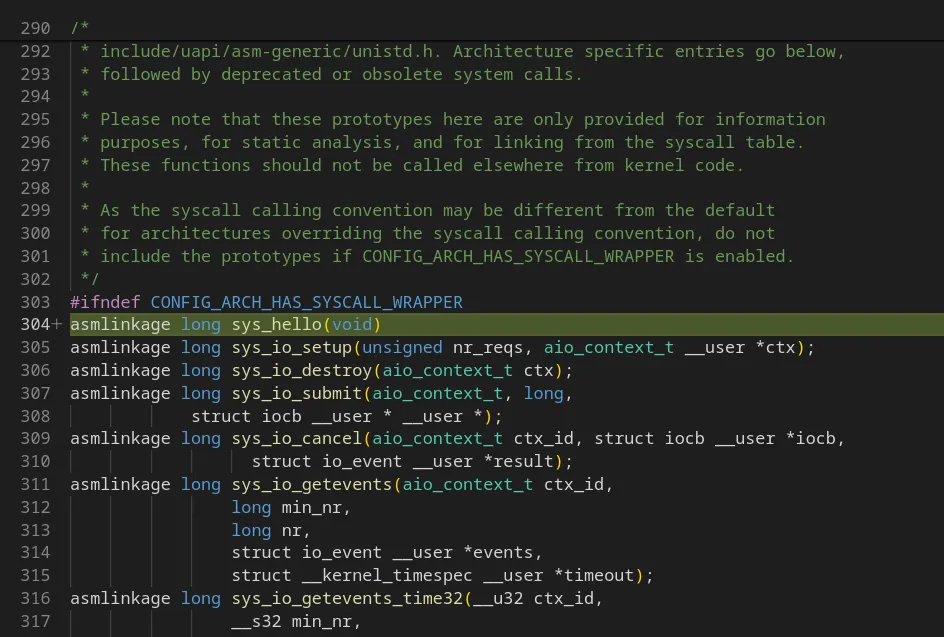
    Open the file “syscalls.h” inside this directory, and add

    asmlinkage long sys_hello(void)
    

    captionless image

    This is a prototype for the syscall function we created earlier.

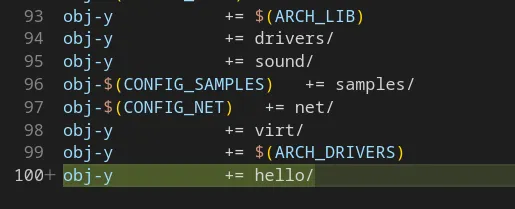
    Open the file “Kbuild” in the kernel root (cd ../..) and to the bottom of it add

    obj-y += hello/
    

    captionless image

    This tells the kernel build system to also compile our newly included folder.

    Once done, we then need to also add the syscall entry to the architecture-specific table.

    Each CPU architecture could have specific syscalls and we need to let them know for which architecture ours is made.

    For x86_64 the file is

    arch/x86/entry/syscalls/syscall_64.tbl
    

    Add your syscall entry there, keeping in mind to only use a free number and not use any numbers prohibited in the table comments.

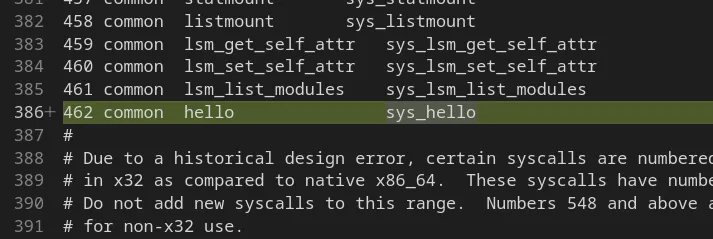
    For me 462 was free, so I added the new entry as such

    462 common hello sys_hello
    

    captionless image

    Here 462 is mapped to our syscall which is common for both architectures, our syscall is named hello and its entry function is sys_hello.

    Compiling and installing the new kernel

    Perform the following commands

    NOTE: I in no way or form guarantee the safety, security, integrity and stability of your system by following this guide. All instructions listed here have been my own experience and doesn’t represent the outcome on your systems. Proceed with caution and care.

    Now that we have the legal stuff done, let’s proceed ;)

    cp /boot/config-$(uname -r) .config
    make olddefconfig
    make -j $(nproc)
    sudo make -j $(nproc) modules_install
    sudo make install
    

    Here we are copying the current booted kernel’s config file, asking the build system to use the same values as that and set default for anything else. Then we build the kernel with parallel processing based on the number of cores given by nproc. After which we install our custom kernel (at own risk).

    Kernel compilation takes a lot of time, so get a coffee or 10 and enjoy lines of text scrolling by on the terminal.

    It can take a few hours based on system speed so your mileage may vary. Your fan might also scream at this stage to keep temperatures under check (happened to me too).

    The fun part, using the new syscall

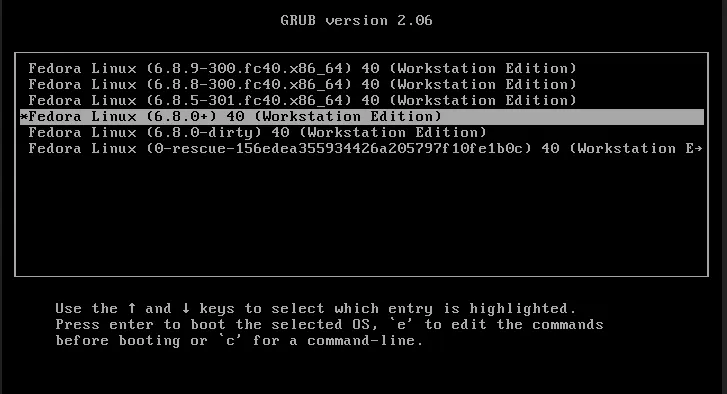
    Now that our syscall is baked into our kernel, reboot the system and make sure to select the new custom kernel from grub while booting

    captionless image

    Once booted, let’s write a C program to leverage the syscall

    Create a file, maybe “test.c” with the following content

    #include <stdio.h>
    #include <sys/syscall.h>
    #include <unistd.h>
    int main(void) {
      printf("%ld\n", syscall(462));
      return 0;
    }
    

    Here replace 462 with the number you chose for your syscall in the table.

    Compile the program and then run it

    make test
    chmod +x test
    ./test
    

    If all goes right, your terminal will print a “0” and the syscall output will be visible in the kernel logs.

    Access the logs by dmesg

    sudo dmesg | tail
    

    And voila, you should be able to see your syscall message printed there.

    Congratulations if you made it 🎉

    Please again remember the following points:

    • Compiling kernel takes a lot of time
    • The newly compiled kernel takes quite a bit of space so please ensure the availability
    • Linux kernel moves fast with code changes